Finding verified Shopify store owners email addresses is a fantastic shortcut for growing your online B2B sales pipeline this year. When you know how to build a clean list of decision makers, your sales crew can reach out to real retail founders and operations managers without getting stuck behind gatekeepers.
This modern outreach playbook teaches you exactly how to find, clean, and message those high-value targets while protecting your domain health from strict junk filters.
By using automated lookup directories, advanced web search formulas, and professional corporate networks, you can consistently uncover real digital business profiles and secure valid contacts to close more active e-commerce client accounts quickly.
Why Shopify Store Owner Emails Are Highly Valuable for B2B Sales
Shopify store owner email addresses give you a direct line to online businesses that make money every day. These shops spend money on software, shipping help, and marketing tools to grow.
Having these real addresses lets you talk to the boss instead of an assistant who cannot buy your business services. When you need high-quality data for your B2B sales campaigns, implementing an Industry-Specific Lead Generation plan is your best move. It changes everything.
In 2026, finding real shop contacts is highly important because internet stores constantly buy third-party tools to cut costs. These owners need new solutions to boost their sales numbers and fix shipping problems.
When you message them directly, you skip the middleman and present your tools straight to the person who holds the budget. Learning how to find Shopify store owners’ email addresses gives your sales team a huge advantage. It brings massive power. You move faster than your rivals when you have the direct inbox of a verified founder.
Role-Based Targeting: Reaching Founders vs. E-commerce Managers
Role-based targeting means finding the exact person who has the power to buy what you sell. For small web shops, the founder makes every single choice, while major online brands employ hired managers to run the daily work.
You must change your business pitch message completely depending on the size of the store you want to target.
| Store Size / Revenue | Primary Contact Target |
| Small ($0 – $100k) | Founder / Owner |
| Medium ($100k – $1M) | E-commerce Manager / Growth Marketing |
| Large ($1M+) | Director of E-com / Head of Supply |
Sending a pitch about a big shipping tool to a busy founder who works alone makes sense. But as web shops grow larger, you should send that same pitch to a department manager instead.
This keeps your message in front of the right helper who handles that specific daily problem.
Multi-Person Outreach: Why Targeting Multiple Contacts Increases Response Rates
Multi-person outreach means sending distinct emails to a few different bosses inside the same online brand. This smart method helps your sales plan succeed even if one manager leaves or deletes your note.
It builds internal talk about your product and stops your sales pitch from getting totally stuck or forgotten by the company leadership team. This is a key part of client acquisition for bootstrap saas startups trying to find their first users. It works. You avoid getting blocked by one single helper.
If you only send a note to the top founder, your text might get lost in their messy inbox. When you write to the marketing boss and the operations chief at the same time, they talk to each other.
This teamwork approach raises your chance of getting a reply by thirty percent.
Protecting Your Sender Reputation with Verified Merchant Data
Protecting your sender health means making sure your business notes go to real inboxes instead of spam folders. You do this by only messaging active addresses that exist.
In 2026, security systems automatically block senders who mail bad addresses, which makes clean company lists crucial for surviving modern spam filters and protecting your domain status.
When you send mail to dead addresses, systems like Google think you are a bad spammer. This harmful mistake ruins your domain score fast. Using clean and verified lists keeps your bounce numbers below two percent, which keeps your corporate email servers safe, healthy, and working perfectly for a long time.
Method 1: Using Specialized E-commerce Databases (The Fastest Option)
Specialized shop databases let you search through millions of active web stores using simple filters like location or software type. This digital method is the absolute quickest way to build a great list of quality leads. You save hours of boring work by downloading whole files filled with real executive names and correct email addresses.
Instead of looking up shops one by one, these smart platforms let you download thousands of clean rows very quickly. They do the hard work for you by matching shop website links with checked executive contact notes. This gives your sales crew a massive list of fresh targets instantly.
StoreInspect and BrandNav: Built for E-commerce Lead Generation
StoreInspect and BrandNav are special data platforms made just to track online shops and their executive contact info. They check millions of real websites daily to keep their facts correct.
This ensures you do not waste time on old businesses that closed down months ago and gives you great data for your campaigns.
You can sort your searches by monthly sales, physical town, or social media follower numbers. This helps your team find the exact shops that can afford your professional services.
It prevents you from pitching large tools to small shops that do not have money yet.
Sourcing Raw Store Lists via BuiltWith and Myip.ms
BuiltWith and Myip.ms are technical lookup systems that find websites by checking the special code or servers they use. They give you huge lists of every live website running on the Shopify system.
This step gives you a wide look at the market and helps you gather thousands of fresh links for your outreach.
[Filter by Technology: Shopify] ➔ [Filter by IP/Hosting: Myip.ms] ➔ [Export Raw URL List]
These files contain thousands of websites, but they do not list real human names. You must combine these raw website links with an address finder tool to get the names of the bosses.
This step turns raw web pages into useful sales leads.
What Data Attributes to Look for in a Store Directory
A great store directory must give you much more than just a basic website link or general office email. High-quality sales work requires deep details so you can change your message for each shop.
This makes your cold notes feel personal and helpful to the retail operator who opens your business message.
Look for lists that show monthly ad spending, active tools, social pages, and worker counts. Knowing a shop uses a specific email tool lets you suggest a matching service easily.
This extra data helps you write better notes that get more responses.
Method 2: Google Dorking and Advanced Search Strings
Google Dorking means using special search commands to skip normal results and find hidden public data. It helps you discover specific pages where web shop owners list their personal business details.
This free strategy uncovers great leads that basic web searches miss completely, helping your team build lists without spending any extra money.
By using quotes and special code terms, you tell Google to look only for specific shop footprints.
This lets you dig deep into public forums and profile pages. It is a fantastic free method for teams with small budgets.
The “site:my.shopify.com” Footprint Hack
Every Shopify shop gets a hidden back-end link ending in my.shopify.com when the owner first sets it up. Many store owners accidentally leave this footprint visible on public directories or help pages.
You can use this public pattern to find them and gather their real business details for your outbound sales lists.
Search String Example: site:my.shopify.com "apparel" "email"
Running this exact text string tells Google to show only live Shopify shops in the clothing niche that list the word email on their pages. This trick gives you a fast list of fresh business targets for free.
Combining Footprints with Niche Keywords and Locations
To make your advanced web searches work well, you must mix the tech footprint with real shop styles and city names. This narrows your search down to your exact target market.
It keeps your list clean, highly focused, and packed with real company builders who need your specific B2B software or marketing help.
For example, searching for gym gear shops in Texas requires a specific mix of words. This smart step ensures you do not waste hours looking at overseas shops that cannot provide your local services. It saves your team lots of time.
Method 3: The Facebook Ad Library to LinkedIn Pipeline
The Facebook Ad Library to LinkedIn pipeline is a hands-on strategy that connects active advertisers to their professional corporate profiles. This ensures you only message shops that spend money to grow.
It is a great way to find high-value clients who are looking for tools to boost their business returns.
By matching public ad details with professional networks, you find real managers who are investing cash into their businesses right now.
This means they have a budget and want tools to scale. It is highly effective for modern sales.
Step 1: Identifying Active Spenders in the Ad Library
The Meta Ad Library is a free public tool where you can see every single advertisement running on Facebook and Instagram. Type in rival names or business words to see which brands are spending cash.
This shows you who is active and tells you which companies are using paid media to build their brand presence.
If a web shop pays for ads, they have a real budget and a strong need to get more customers. Write down these brand names in your sales tracking sheet.
This forms the base of your high-quality lead list.
Step 2: Finding Decision Makers on LinkedIn Sales Navigator
Once you have a list of active ad spenders, paste those company names into LinkedIn Sales Navigator to see their worker list. Sort the results by job title to find the true leaders.
This helps you target the right person who can actually sign off on a new business contract or software deal.
Look for titles like Founder, Owner, or Head of E-commerce. This easy step helps you skip lower-level workers and focus entirely on the person who actually controls the company bank account. It makes your outreach much smarter.
Step 3: Extracting Corporate Emails via Apollo.io, Lusha, or Kaspr
After finding the right profile on LinkedIn, use a browser tool like Apollo, Lusha, or Kaspr to see their direct business email address. These smart tools check public files to find the correct string.
This gives you a direct link to the top business decision makers without dealing with assistants.
[LinkedIn Profile View] ➔ [Activate Browser Extension] ➔ [Reveal & Export Verified Corporate Email]
This method gives you a personal, professional mailbox instead of a generic support address. Messaging a personal inbox drastically improves your chances of getting a real answer from the boss. It makes your sales work count.
Method 4: Automated Website Scraping (About, Team, and Contact Pages)
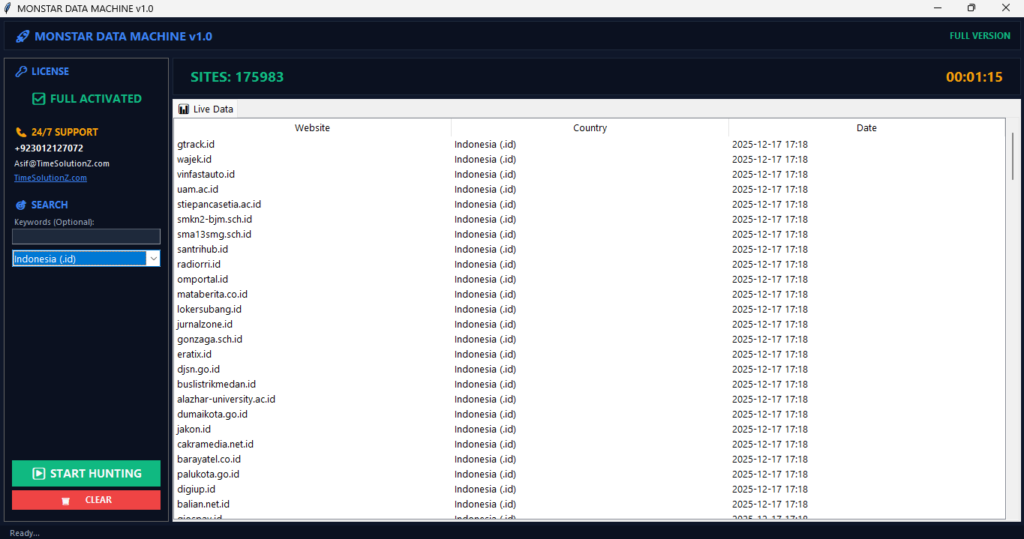
Automated website scraping uses software bots to read shop pages and find text that looks like email addresses. It allows you to check thousands of online stores at the same time.
This saves your team from manually clicking through pages and helps you collect large volumes of contact data in a few minutes. Just as you might study how to find off-market properties using data scrapers when exploring real estate datasets, you can apply similar digital scraping logic to pull store records. The tech is identical. It works very cleanly.
Instead of opening sites one by one, the bot reads the webpage’s hidden code. It pulls out every contact point listed on the site in just a few seconds. This turns big lists into useful data fast.
Monster Email Extractor: Deep Web Crawling for Massive Domain Lists
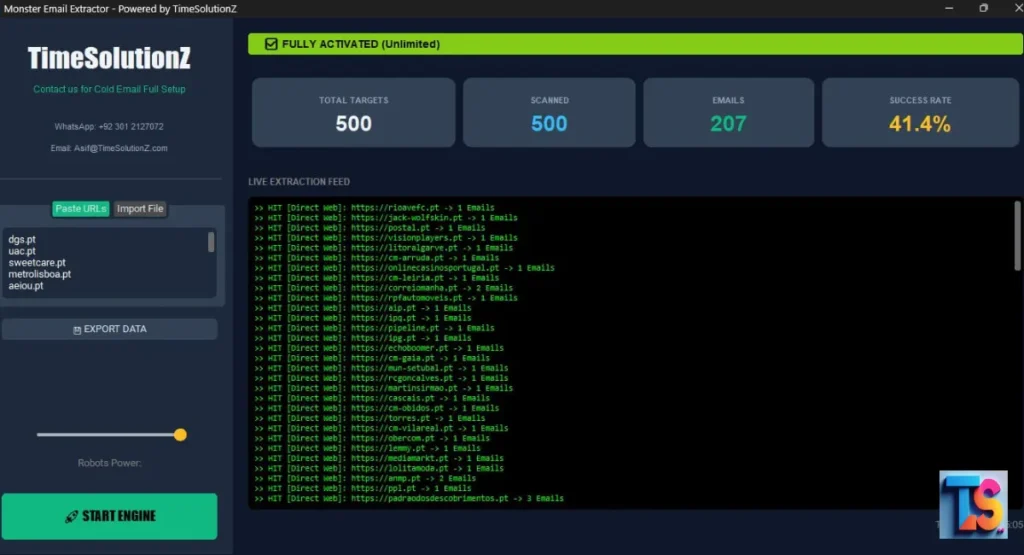
When you have a raw list of thousands of Shopify domains from sources like BuiltWith, you need a specialized tool to find the hidden emails inside them. Monster Email Extractor is a powerful tool built explicitly for cold emailers and B2B marketers who need deep data scraping.
It was created by TimeSolutionZ, an established digital agency known for its outreach automation and lead-generation services.
The system runs entirely on autopilot. You can upload a raw list of domain names from a few dozen to one million via TXT or CSV files. The bot automatically visits each site sequentially to look for hidden contact data.
It systematically clicks through important sub-pages, prioritizing targeted areas like “Contact Us”, “About Us”, and team directories to find the right builders.
This software bypasses standard web text limitations easily. It parses and extracts email addresses embedded inside PDFs, text files, and images hosted on the target websites.
The platform transparently guarantees a 40%+ data fill rate on valid corporate websites, giving you realistic expectations instead of fake promises.
Once done, your extracted lists can be instantly downloaded as Excel or CSV files.
Even better, it includes a native integration with the TS Email Validator to scrub out bounces before campaigns launch, keeping your pipeline perfectly clean.
TS Email Validator: Bulk Data Cleaning for Non-Technical Users
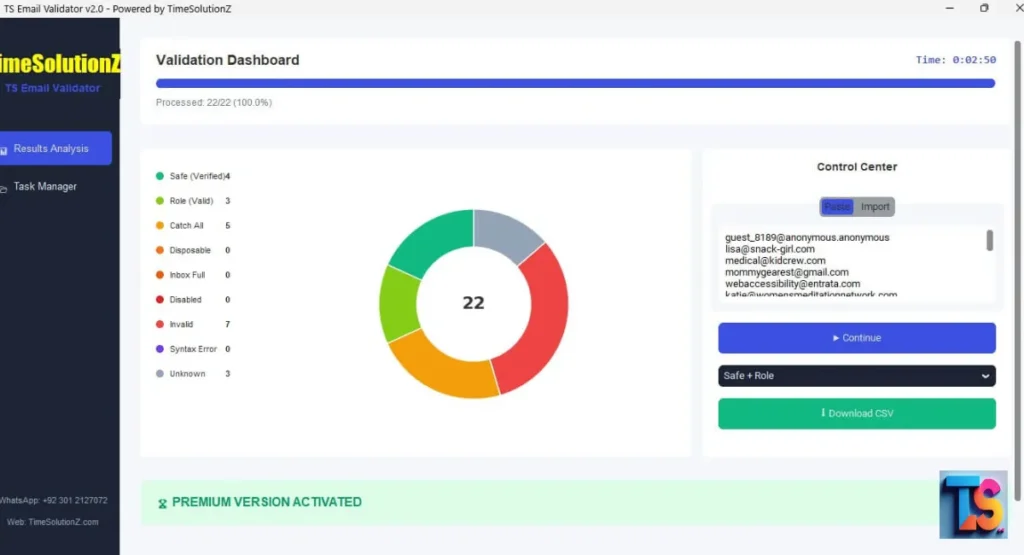
If you extract thousands of addresses using bots, you need a powerful tool to clean that raw data. TS Email Validator is a great no-code desktop application made just for list cleaning and email marketing optimization.
It runs on your computer. You do not need to know any programming or write complex code libraries to use it.
This downloadable software is built to handle massive jobs easily. It processes roughly 2,500 emails in 2.5 minutes. That is fast.
The tool can handle list sizes from 1,000 to over 1 million emails without dropping in speed. It works great for big teams.
You can load your lists quickly using CSV, TXT, or simple copy-paste methods. Once the check finishes, you can export a fully cleaned list in a single click. It saves time.
The app gives you detailed status reports by automatically flagging addresses into categories like Safe, Invalid, Unknown, Role-based, Disposable, Inbox Full, Disabled, and Syntax errors. This deep filtering keeps your data perfect.
Scraping Contact Pages for General Inquiries
Scraping contact pages focuses on pulling general company addresses like info@ or hello@ from help areas. While these are not personal boxes, they work as a safe starting spot.
They are easy to find and give your sales team a way to initiate contact with new brands that fit your buyer profile.
Customer service teams or virtual assistants check these general mailboxes every single day.
If your message is highly relevant and helpful, these workers will often forward your note to the owner. This gets your foot in the door.
Using Email Finder Extensions to Extract Personal Emails on the Fly
Email finder tools work right inside your internet browser to check the hidden background data of a shop while you look at it. They find corporate connections linked to that domain name instantly.
This helps you build lists as you browse different retail websites and gives you immediate executive data on demand.
When you visit an online store, the tool checks the website name against its own large directory of corporate filings.
It immediately shows you the names and jobs of known bosses linked to that exact brand. This makes manual research fast.
Method 5: Domain WHOIS Lookup
A WHOIS lookup is a public search that shows the registration details and ownership records of a website name. Every shop owner must give their contact details when they buy a web link.
This public data is stored centrally and can reveal the private corporate ownership details of smaller internet retail brands.
This search can show you the real name, phone number, and email address used to buy the website domain.
It is an old-school tracking method that still brings great value to modern sales teams. It helps uncover hidden details.
How WHOIS Works for E-commerce Domains
When a shop owner buys a website link for their Shopify store, the registry company records their personal details in a central folder.
You can search this folder using free online lookup tools to find the administrative contact behind the web business. This process bypasses traditional company filters and links you to the founder.
If the owner used their personal information to buy the site, that data sits in the public file. A quick check gives you direct access to the founder’s personal admin inbox. This bypasses all gatekeepers.
What You’ll Typically Find (And How Privacy Proxies Affect It)
While these lookups are strong, modern privacy rules mean many shop owners use privacy guards to hide their names. In these cases, the public file will show blocked or fake proxy notes instead of real data.
You must know how to handle these files when checking out a list of prospects.
| Privacy Status | Contact Details |
| Without Privacy Proxy | JohnDoe@storename.com Direct Phone Number |
| With Privacy Proxy (GDPR/Data Guard) | redacted-for-privacy@domainprotect.com Registrar Contact Number |
When privacy shields are turned on, the proxy address will still pass your notes along to the owner’s real inbox. However, your message might look less personal because you do not know their actual human name.
Method 6: Email Pattern Guessing
Email pattern guessing means using common company naming habits to predict a boss’s exact address.
Most businesses follow a strict setup for all their workers. If you know the founder’s full name and web link, you can quickly guess their email address.
This strategy keeps your prospecting moving forward when tools cannot scan the site.
This smart strategy helps you find addresses when standard tools fail to scrape the site. It uses basic logic to fill the gaps in your list. It is highly accurate for small companies.
Common B2B Email Patterns for Executive Teams
Most young online brands use simple email setups for their leaders to keep internal communication easy. Smaller teams almost always choose first-name configurations because they do not have many workers yet, making it simple to find the right combination for your outbound data sheet.
| Email Pattern Setup | Example Address |
| firstname@company.com | john@brand.com |
| firstname.lastname@company.com | john.doe@brand.com |
| initials@company.com | jd@brand.com |
Testing these three basic styles covers most online stores. This lets you build smart guesses using nothing but basic worker names. It is a great trick for professional researchers.
Tools for Automating Pattern Adjustments
Instead of guessing combos by hand, you can use free tools like Email Permutator or Hunter.io to make every possible variation instantly.
You just type in the person’s name and their website link to create a complete list of possibilities for your verification software to test. This cuts down on your manual work.
The software gives you a complete list of possible address options. You can then drop these variations into a checking tool to see which specific corporate box is real and ready to take messages. This saves hours of typing.
Method 7: Tapping into E-commerce Communities and Social Networks
Online groups and social networks are digital hubs where shop owners talk about growth plans, software bugs, and marketing tricks. These spaces are amazing places to find real business leads naturally.
Owners use these spaces to look for answers, which makes it easy to spot brands that need your corporate solutions.
Because people visit these groups to get help, they share their website links and personal details often. Talking to people here lets you find hot prospects who are dealing with business problems right now. This makes selling easier.
Extracting Contacts from Facebook Groups and Discord Servers
Private Facebook groups and busy Discord channels for Shopify users are full of real store bosses. Members often post to get notes on their site design or help with theme updates, giving you a wonderful opportunity to collect active contact names and web addresses for your growing business database.
By watching who posts in these spaces, you can find active founders easily. You can then check their personal profile pages to find their business emails or message them directly. This builds a warm connection fast.
Sourcing Warm Leads from Niche Subreddits and Instagram Bios
Online spaces like Reddit are filled with shop owners fixing their digital stores. Also, brands put their direct contact emails right in their Instagram bios so creators can message them easily, which provides a simple way for your sales team to find active business targets without using complex software.
[Reddit Troubleshooting Post] ➔ [Analyze Store Link] ➔ [Check Instagram Bio for Direct Email]
Addresses found in social bios are placed there on purpose for public messages. This means these shop owners check that specific inbox for new business opportunities every day. This makes them highly valuable targets.
How to Verify Shopify Store Emails Before Launching Outreach
Checking emails means testing if an address truly exists and can receive mail before you send a message. This mandatory step cleans your data files completely. In 2026, mailing unverified lists causes modern security filters to flag your domain immediately, making list cleaning a requirement for keeping your business mail system alive.
Sending messages to unchecked lists will ruin your sender rating fast. Cleaning software pings the recipient’s mail server silently to check if the box is live. It does this without sending a real message to the person.
Why Verification Matters: The Danger of Catch-All Emails
Checking data matters because many shop servers use catch-all setups. A catch-all setup takes every email sent to their website name, even if the specific username is completely fake or dead, which creates a dangerous trap for your sales team if you rely on basic data extraction scraping tools.
If you mail dead usernames on a catch-all site, the server takes them at first but drops them later. This trick fools basic tools. You need advanced cleaning tools to spot this trap and save your domain.
Top Email Verification Tools Compared (Snov.io, ZeroBounce, UpLead)
Choosing the right cleaning tool depends on the size of your list and how clean you need it to be. Different tools use different tests to make sure your data rows are real and completely safe for your sales team to use during large email campaigns.
| Tool Name | Accuracy Rating | Key Strength |
| ZeroBounce | 99% | Best for detecting spam traps |
| UpLead | 95%+ Guarantee | Built-in verification during download |
| Snov.io | 93% | Great for fast, affordable bulk checks |
| TS Email Validator | High-Speed Bulk | No-code desktop app for lists up to 1M |
Using a top tool like ZeroBounce ensures that fake accounts, dead mailboxes, and typos are removed from your file. Doing this before you start your campaign keeps your business safe.
Setting Your Target Verification Rate to Avoid Spam Filters
Your target list cleanliness score must always be above ninety-eight percent to keep your email plans working well.
Anything lower risks hurting your company’s domain health and blocking your messages from landing in the main inbox.
You must remove risky addresses immediately to protect your outbound technical score from modern filters.
If your list cleaning software shows that many targets are risky or bad, delete those rows from your sheet immediately.
It is always better to mail fewer people than to get your company blocked.
Step-by-Step Workflow for Building a Shopify Contact Database
Building a great shop database requires a clean, repeatable system. Follow this step-by-step guide to create a fresh list of targets from scratch without making mistakes.
This clear process keeps your data organized and ensures you only reach out to retail brands that match your product requirements.
Step 1: Find Target Stores and Filter by Revenue or Stack
Start by pulling a raw list of Shopify stores using a shop directory or technical tool. Apply simple business filters to make sure these brands match the ideal clients you want to serve.
This early preparation prevents your team from spending hours working on the wrong company profiles.
[Filter: Shopify Platform] ➔ [Filter: $500k+ Annual Revenue] ➔ [Filter: English Language]
Filtering your list early ensures you do not waste time checking tiny hobby blogs. It keeps your team focused on real businesses that have the money to pay for your corporate services.
Step 2: Prioritize Decision Makers by Fit
Take your filtered store list and check it against a professional network like LinkedIn to find the real bosses. Focus heavily on matching job titles to the value your tool brings.
This step ensures you talk directly to the person who experiences the business pain your software solves.
If you sell a design app, look for art bosses. If you sell a warehouse tool, target operations managers. Write down these names right next to their store website links.
Step 3: Bulk Extract Corporate and Personal Contacts
Use a trusted business contact tool to find the email addresses linked to your list of bosses. Run this search in big groups to keep your daily work fast and efficient.
This keeps your pipeline full of high-quality executive contacts without slowing down your weekly sales motion.
Make sure your tool pulls both the person’s real name and their job title. Having this clear data organized in neat rows makes it much easier to write custom notes later on.
Step 4: Run a Multi-Step Email Cleaning Process
Take your new data file and upload it to a top email cleaning platform. Run the whole list through domain tests and catch all checks to remove bad accounts.
This protection step saves your domain from getting blacklisted by big inbox providers during your outbound campaigns.
[Raw CSV Export] ➔ [Run ZeroBounce Verification] ➔ [Delete Invalid Rows] ➔ [Final Clean List]
Delete every single address marked as bad, old, or highly risky. This main step is your best shield against modern spam filters and domain blocks. Never skip this part.
Step 5: Export Clean Leads to Your CRM
Upload your checked, high-quality list into your sales software or cold email tool. Match your data fields carefully so human names and store brands align perfectly on every row.
This ensures your automated notes insert the correct shop names and titles every time you send a batch.
Tag the new file with the current date and data source. Keeping your files organized helps you see which lists bring the most sales and best reply rates over time.
Top Shopify Store Owner Email List Providers Compared
Using a checked list provider is the fastest way to grow your business sales efforts. Here is a simple comparison of the top data platforms in the market today, helping you choose the best partner for your specific sales budget and database needs.
1. LeadsMunch (Best for Verified Bulk Lists)
LeadsMunch excels at providing pre-made, deeply checked directories of online shops. They update their e-commerce files constantly to fix closed stores and changed domain names. This consistent monitoring ensures you get fresh merchant targets that are ready to receive your special business proposals.
It is an excellent choice if you want to buy big lists of targeted Shopify leads without running complex scraping tools yourself. Their files come organized with useful store sales data.
2. Apollo.io (Best for Scale and Filtering)
Apollo holds a massive business directory with millions of checked professional profiles. Their search page offers great filtering choices for finding specific workers in the e-commerce field.
This massive system allows you to build very large data files based on detailed worker demographics.
You can sort workers by time on the job, city, and corporate title while filtering for teams that use Shopify. This makes it a wonderful tool for building custom lists.
3. UpLead (Best for 95%+ Accuracy Guarantees)
UpLead is famous for its strict data accuracy promise. They check every single email address in real time right when you click the download button, ensuring your information is completely fresh.
This real-time safeguard keeps your data quality exceptionally high from the very start.
If an address bounces, they give your data credit back to you. While it costs more per lead than other sites, the clean quality saves your company’s domain name from blocks.
4. Cognism (Best for Compliance and International Data)
Cognism is a top data seller that focuses heavily on local privacy rules, making it the best choice for European sales. They check mobile numbers and company identities by hand.
This careful, hands-on approach keeps your sales team perfectly aligned with international standards.
If you want to target larger international Shopify brands in the UK or Europe, their strict care for local laws keeps your sales team legally safe and well protected.
5. ReachStream & Lusha (Best for Direct Dials)
ReachStream and Lusha are great at finding direct mobile numbers alongside standard business emails. They specialize in finding personal contact points for corporate leaders.
This dual approach gives your sales reps more ways to connect with busy executives who ignore normal inbox messages.
Having access to both a checked email and a direct phone number lets your team run multi-channel campaigns.
You can combine cold emails with direct phone calls to get better results.
Best Practices for Cold Emailing Shopify Merchants Ethically
Messaging online store owners requires a professional and polite style. Following clean guidelines protects your brand name and ensures you stay inside international laws. This careful approach helps you build good relationships with online shop owners instead of annoying them with poor outreach habits.
Deep Segmentation by Store Traffic, Technology, and Category
Never send the same generic sales blast to your entire database. Separate your lists into small, focused groups based on store niche, traffic numbers, and active software tools.
This focused setup ensures every merchant receives a note that perfectly matches their current business situation.
- Segment A: Clothing stores using Klaviyo with over 50k monthly visits
- Segment B: Cosmetics brands using Mailchimp with under 10k monthly visits
Writing custom copy for each small group makes your pitch feel like an organic choice rather than a cold robot message. This boosts your replies.
Staying Compliant with GDPR, CAN-SPAM, and Data Privacy Laws
You must ensure your email campaigns follow all international data rules, including CAN-SPAM and GDPR. Breaking these strict privacy laws can lead to major financial fines for your business.
Staying legal keeps your company out of trouble and shows that you respect consumer data protections.
Always include a clear opt-out link in every note, use honest subject lines, and never hide your identity. When messaging European citizens, you must prove a real business interest.
Crafting High-Converting, Personalized Value Propositions
Shopify bosses are busy people who see dozens of pitches every week. To stand out, your sales value must be short, clear, and focused entirely on their specific business growth.
You must grab their attention in the first sentence by presenting an undeniable win for their online shop.
Do not write long paragraphs about your own history. Focus completely on their shop: point out a real problem on their page and explain how your tool fixes it to grow their sales.
FAQs
Can I get a Shopify store owner email list for free?
You can build a free list using advanced Google search strings, watching niche web forums, or checking public Instagram bios. Free accounts on data tools like Apollo also give you limited monthly exports without charging you any money.
How do I find the specific contact info for a Shopify founder or CEO?
Find the brand name first, then use LinkedIn Sales Navigator sorted by titles like founder or CEO. Once you locate the correct page, use an extraction tool like Lusha to see their direct business address.
Is it legal to scrape or buy Shopify store owner emails?
Yes, it is legal in most places as long as you only gather public business contact data. You must follow privacy rules like CAN-SPAM and GDPR by giving people a clear way to opt out immediately.
What is considered a good email verification rate for e-commerce lists?
A high-quality sales list should have a cleanliness score of ninety-eight percent or better. Keeping your list clean ensures your campaign bounce numbers stay below two percent, which protects your servers from spam flags.
How many contacts should I target per Shopify store?
For small storefronts, message just one leader, like the main owner. For mid-sized or large brands, target two or three distinct workers across marketing, tech, and operations to get the best overall response rates.
Should I send cold emails to catch-all email addresses?
Yes, you can mail catch-all addresses, but you should put them in a separate group. Because these domains are harder to test with total certainty, separating them protects your main domain from sudden bounces.
How often should I re-verify my Shopify merchant database?
You should clean your list every thirty to sixty days. Online stores close down, switch website names, and change management teams very fast, meaning old lists quickly become risky to use without a fresh check.
Summary
Finding Shopify store owner email addresses is a powerful way to grow your business sales funnel. The most successful approach mixes automated tools like shop directories with hands-on research methods like LinkedIn searches, ensuring you collect high-quality executive data for your B2B campaigns.
Never skip the cleaning step before you launch your outbound campaigns. By keeping your data clean, splitting your lists into smart groups, and writing short value pitches, you will land in the primary inbox constantly and close more business deals.