If you want your business to grow, you must keep your private messages away from your work outreach. When you mix them, your emails often end up in the junk folder.
Smart marketers know that using a dedicated system is the only way to stay safe. It helps you domain reputation, ensures email deliverability, and builds real brand trust with every client.
By choosing to Separate Personal and Business Emails in Bulk, you stop spam filters from blocking your hard work. This simple step keeps your sender identity clear and helps you reach your goals faster. Start today to protect your future growth and keep your communication professional, clean, and reliable.
The Risks of Mass Emailing from a Personal Email Address
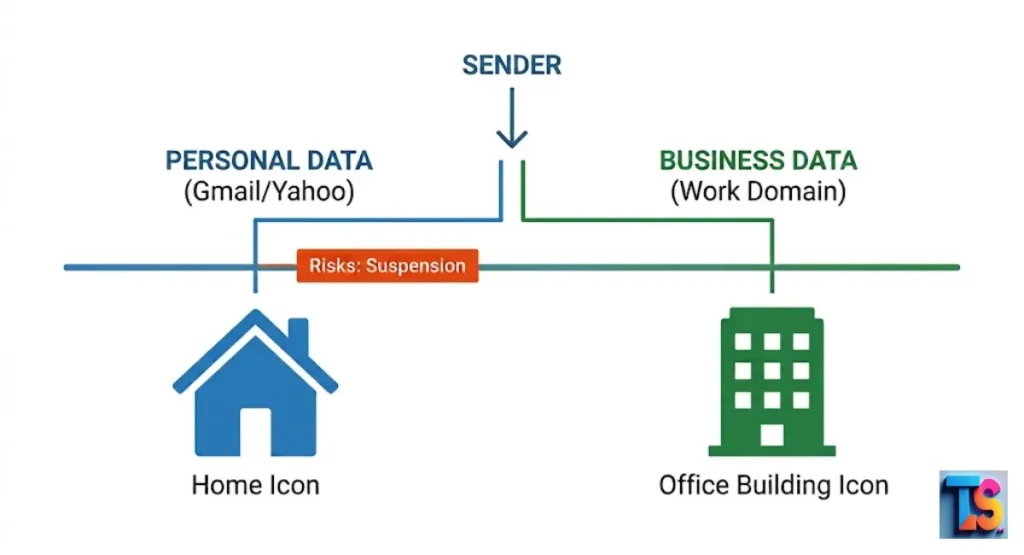
Sending bulk messages from a personal account often triggers automatic security blocks that stop your outreach entirely. Email providers monitor sending patterns very closely to identify potential spam.
When they detect high-volume activity from a standard user account, they immediately treat it as suspicious behavior. This leads to restricted sending limits and can eventually lock you out. Use dedicated infrastructure for all your professional communication to avoid these permanent account blocks.
Personal email providers design their infrastructure for one-to-one conversations rather than high-volume distribution. When you attempt to push marketing campaigns through these systems, the servers identify this as a violation of their terms.
This often results in a permanent loss of access to your personal files, contacts, and historical data, which disrupts your daily operations and long-term business continuity.
The Challenges of Being Blacklisted
Being blacklisted means your email address is added to a global list of blocked senders, which prevents your messages from being delivered. Internet service providers use these lists to protect their users from harm.
Once your domain or IP address is on these lists, almost all your future emails will bounce back, regardless of your good intent. Always use professional bulk email services to avoid this outcome.
Landing on a global blocklist effectively silences your digital outreach efforts for weeks or months. Once your domain is flagged, getting it removed requires lengthy appeals and strict proof that you have corrected your sending behavior.
This downtime forces you to rely on expensive, alternative communication methods to reach your customers, which hurts your brand’s overall revenue and market visibility.
Account Suspension and Deliverability Issues
Major email providers have very strict terms of service regarding bulk mail, and they will enforce these rules. Sending mass messages from a personal account violates these policies.
Providers will suspend your account without warning to protect their network. Even if they do not suspend you, your deliverability rates will plummet because personal accounts lack the necessary reputation. Always verify your sending limit settings.
When your account faces restrictions, your messages experience high bounce rates and frequent delivery failures. This creates a ripple effect where your valid business correspondence also gets ignored or blocked by recipient filters.
Maintaining a professional reputation requires dedicated infrastructure that supports consistent delivery, whereas relying on personal accounts forces you to manage constant technical barriers and unexpected service outages.
Negative Impacts on Brand Professionalism
Using a personal email address for business outreach damages how customers see your company and reduces your credibility. It suggests a lack of resources or legitimacy. Clients prefer to receive communication from professional domains.
A personal address lacks the branding and trust indicators that professional emails provide, which significantly lowers your conversion rates and hurts your long-term growth. Investing in custom domains builds trust.
Potential partners often use professional email addresses as a key indicator of whether a company is trustworthy and stable. When you send official offers from a generic or personal address, you create an immediate perception of amateurism.
This misalignment between your professional goals and your communication channel often causes high-value prospects to ignore your messages entirely in favor of more established competitors.
Why You Should Separate Your Transactional and Your Marketing Email Sending
Separating these email types is vital for maintaining a clean sending reputation and ensuring your messages arrive safely. Marketing emails often have lower engagement than transactional emails like receipts or account updates.
If marketing emails cause recipients to mark you as spam, it hurts the delivery of your important transactional messages. Keeping them separate isolates these risks. Proper Data Hygiene & Segmentation protects your critical business operations.
Transactional emails are time-sensitive and highly expected by the recipient, which makes them very valuable for your sender reputation. When you combine them with promotional material, you risk losing that high-trust status.
Segregation ensures that even if a specific marketing campaign receives lower engagement, your vital receipts, order confirmations, and security alerts continue to arrive reliably for every single customer.
Spam Complaints
If your marketing messages contain promotional content that users did not ask for, they will report it as spam, which ruins your reputation. High spam complaint rates alert internet service providers to lower your sender reputation.
When your reputation falls, all your emails may stop reaching your customers. You must keep your spam rate under 0.3% to meet current 2026 inbox standards. Follow these rules to protect your deliverability.
Most modern email providers use sophisticated machine learning to track how users react to your specific content. When a user marks an email as spam, it serves as a direct, negative signal to the provider that your business is not a safe sender.
Consistently exceeding these complaint thresholds triggers automated filters that will redirect all your future business communication into the hidden spam folder.
Spam Content
The content in marketing emails often uses sales-oriented language that spam filters dislike and will block. Transactional emails, however, are functional and expected.
By sending them through the same channel, you risk having your functional emails flagged because they share an infrastructure with your promotional content. This harms your ability to deliver time-sensitive updates to your client base. Always audit your email copy before sending.
Filters examine your subject lines, formatting, and link structures to determine if your message belongs in the primary inbox. Promotional language often includes aggressive calls to action that spam algorithms categorize as low-quality.
By separating your transactional and marketing flows, you ensure that your critical business messages remain free from these restrictive content filters, which keeps your customer relationship channels open and functioning.
Email Delivery Throughput
Professional email services are built to send thousands of emails per hour, which is much faster than standard accounts. Personal accounts are designed for one-to-one communication.
Attempting to send bulk volume through a personal provider creates a bottleneck. This slows down your delivery speed and increases the chance of connection timeouts, which prevents your messages from reaching your audience. High-performance outreach platforms solve this issue.
Reliable infrastructure manages your outgoing traffic queues to ensure that your messages are processed at a steady and consistent pace. Personal accounts do not provide this level of traffic management, which causes massive delays when sending to large lists.
Choosing a professional service allows you to scale your outreach efforts without worrying about server-side limitations that would otherwise stop your campaign mid-delivery.
Blacklisting
Shared infrastructure risks exist even when using professional tools if you do not properly isolate your traffic. If you use the same server for low-quality marketing and high-value transactions, the poor behavior of one segment can blacklist the entire server.
Segregation ensures that your vital transactional emails remain unaffected by the performance of your marketing campaigns, keeping everything safe. Use dedicated server environments to stay secure.
Protecting your server reputation requires constant monitoring of your outgoing traffic to ensure it meets strict quality standards. When you combine disparate types of email, one low-quality list can ruin the delivery for all your other campaigns.
By keeping these infrastructure segments distinct, you ensure that a single, poorly performing marketing initiative cannot destroy the overall delivery capability of your essential business communication platforms.
Shared Email Services
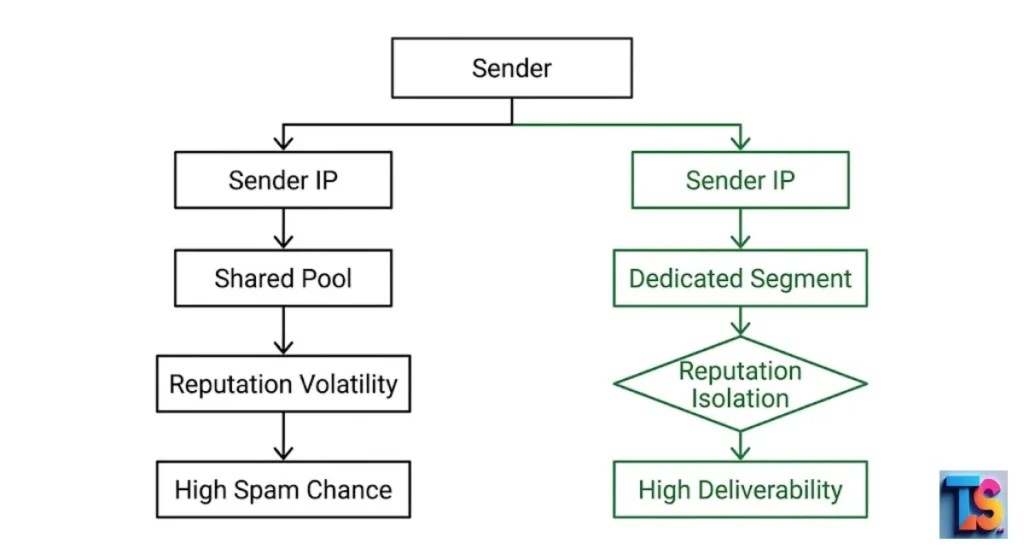
Many low-cost email services use shared IP addresses that can negatively affect your delivery success. If another company using the same shared IP sends spam, your emails might also be blocked.
Dedicated segments allow you to isolate your sending environment, ensuring that your company’s reputation stays under your direct control rather than relying on other users who might compromise you. Always prioritize dedicated IP space.
A shared IP environment means you are often linked to the reputation of hundreds of other companies. If an unknown user on that same network sends unsolicited messages, your emails will experience delivery issues even if your own practices are perfect.
Investing in dedicated segments gives you total control over your digital reputation, which eliminates the risk of being unfairly penalized by the bad actions of anonymous third-party senders.
Key Differences: Bulk Email Marketing vs. Personal Email Outreach
Bulk email marketing requires specialized infrastructure to handle large contact lists and complex delivery tasks effectively. Personal outreach is meant for one-to-one conversations and lacks the technical settings required for mass mailing.
Understanding these differences allows you to choose the right tools for your business, ensuring that your communication remains professional, efficient, and fully compliant with modern industry standards.
| Feature | Bulk Email Marketing | Personal Email Outreach |
| Volume Capacity | High (Thousands/Hour) | Low (Individual/Limited) |
| Authentication | SPF, DKIM, DMARC Required | Not Configurable |
| IP Reputation | Dedicated or Managed Shared | Shared with Millions |
| List Management | Automated & Scrubbed | Manual Only |
| Primary Goal | Scalable Engagement | Direct Relationship |
Technical Infrastructure Requirements
Bulk marketing requires dedicated servers and specialized software to manage large databases safely and efficiently. These systems handle bounces, unsubscribes, and list management automatically.
Personal email providers lack these features, making manual management nearly impossible as your contact list grows beyond a few dozen people. Without this infrastructure, you cannot effectively scale your operations while keeping your sender reputation safe. Use advanced automation to succeed.
Scaling your business outreach requires systems that automatically handle the technical nuances of modern email delivery, such as feedback loops and bounce processing. Manual management of these processes is prone to human error, which directly impacts your sender score.
Implementing specialized bulk tools removes this administrative burden, allowing you to focus on content strategy and engagement rather than troubleshooting server-side connection issues.
Authentication Standards (SPF, DKIM, and DMARC)
Authentication protocols act as a digital passport for your emails to prove your identity. SPF, DKIM, and DMARC confirm that you are authorized to send mail on behalf of your domain.
Personal email accounts do not allow you to configure these, leaving your emails vulnerable to spoofing and lower trust rankings from recipient servers. In 2026, mandatory DMARC enforcement is required. Configure your DNS records now.
Domain authentication is the most critical technical step for proving your legitimacy to modern spam filters. These standards verify that you own your sending domain and have proper permission to contact your audience.
Failing to configure these records in your DNS settings means that your emails are treated as unverified, which guarantees they will be diverted to the spam folder regardless of how high-quality your content is.
The Role of Dedicated vs. Shared IP Addresses
A dedicated IP address gives you complete control over your sender reputation and keeps your traffic isolated. Your reputation is not affected by other senders. In contrast, personal emails share IPs with millions of other users.
You have no control over how those other users behave, which creates constant, unpredictable risks to your delivery rates. Dedicated IPs are essential for long-term health. Avoid reputation volatility by upgrading.
Choosing a dedicated IP address ensures that your sending environment remains isolated and secure. This stability is vital for companies that send high volumes of email regularly.
By removing the influence of unknown third-party senders, you can maintain a high-quality reputation that results in better inbox placement and higher overall engagement rates across your most important lead-nurturing campaigns.
How to Properly Separate Your Email Infrastructure
Properly separating your email infrastructure involves moving your marketing efforts to a dedicated platform that supports your volume. Start by cleaning your list and setting up a professional domain.
This transition protects your primary business communication while giving you the technical capacity to send high-volume emails safely and effectively. Following these steps ensures your brand remains trusted and your messages arrive. Always use a professional ESP.
Building a secure foundation requires you to treat your email sending infrastructure as a primary business asset. This means investing in specialized platforms that offer granular control over your sending environments.
By moving away from multipurpose or personal tools, you eliminate the risk of accidental cross-contamination, ensuring that every email you send, whether transactional or promotional, lands exactly where it should.
Audit Your Current Sending Environment
Review every account you use to send emails to understand your current digital footprint. Identify which accounts are for personal use and which are for business.
List the volume of emails sent from each. If you find high-volume traffic on personal accounts, plan to move that traffic to a dedicated marketing platform immediately. Proper Data Hygiene & Segmentation prevents your primary business accounts from being blacklisted. Start your infrastructure audit today.
An effective audit helps you map out your digital footprint and identify potential points of failure. Once you understand which accounts are carrying your bulk mailing volume, you can systematically migrate those functions to professional services.
This transition is not just about convenience; it is a defensive measure to preserve the long-term viability of your primary team communication and domain authority.
Configure a Dedicated Sending Domain for Business Outreach
Purchase a separate domain specifically for your outreach activities to protect your main identity. This protects your main business domain from any reputation damage.
If you ever face deliverability issues, you can replace or repair the outreach domain without affecting your main company website or your primary team email accounts. This strategy acts as a firewall for your brand reputation and supports your long-term growth. Use subdomains for extra protection.
Using a specific subdomain or a completely separate domain for marketing efforts provides an extra layer of security. If your outreach domain ever encounters a temporary dip in reputation, your main company website remains completely safe and unaffected.
This isolation strategy is a hallmark of an expert, as it allows you to experiment with different outreach tactics while keeping your core brand reputation pristine.
Implement Proper Email Authentication Protocols
Once you have your new domain, set up SPF, DKIM, and DMARC records in your domain’s DNS settings. These protocols prove to receivers that your emails are authentic.
This is the most important step to prevent your emails from being labeled as spam by modern security systems in 2026. DMARC enforcement is now a requirement to maintain your professional sender status. Ensure your security configurations are perfect.
Properly configured DNS records provide the technical proof required for modern email servers to trust your domain. Without this digital handshake, your emails will fail almost every modern security check performed by top-tier providers.
Ensuring these records are correct is a foundational task that directly correlates to your success in the competitive digital landscape of 2026, where security standards continue to become more rigorous.
Transitioning Your Contact Lists to Professional ESPs
Choose a reliable Email Service Provider (ESP) that offers good deliverability and reporting for your campaigns. Import your contacts into this platform, ensuring you remove invalid or unengaged addresses first.
Validating email active status is just as critical as running audits to Check Active WhatsApp Numbers in Bulk. Use this platform for all bulk communication, leaving your personal or primary business email for direct, one-to-one conversations. Modernize your marketing technology stack.
Professional ESPs provide tools that automatically manage your list quality, which is essential for maintaining a positive sender score. When you move your contacts, you gain access to advanced analytics that show you exactly how people engage with your content.
This visibility allows you to refine your strategy continuously, ensuring that your outreach remains both personal and effective at every stage of the customer journey.
Best Practices for Maintaining Email Deliverability in 2026
Deliverability in 2026 relies on engagement and reputation, so you must send emails to interested people. You must only send emails to people who want them. Modern email providers use advanced machine learning to track how users react to your messages.
If users ignore your emails, your future reach will decline significantly. Keeping your content relevant ensures your messages successfully pass modern security checks. Focus on high engagement metrics.
The focus in 2026 is squarely on user-centric communication, where your sender status is determined by the value your recipients receive. You should treat your contact lists as a high-value database that requires constant care and maintenance.
By prioritizing quality over quantity, you align your strategy with the algorithms used by major providers, ensuring that your most critical messages are always delivered to the primary inbox.
High Deliverability Rates
Maintain high rates by only mailing lists of people who have opted in and actively want your content. Monitor your bounce rates and remove hard bounces immediately.
Consistently clean your list to keep engagement high, as sending to abandoned email addresses is a primary reason for low deliverability and poor sender reputation. High performance depends on your commitment to list quality and accurate targeting. Stop emailing inactive contacts.
A clean, responsive list is the best defense against being flagged by spam filters. Every time you send to a dead or inactive email, you signal to providers that your database is not being managed correctly.
By removing these addresses regularly, you increase the likelihood that your emails reach the active, engaged customers who are most likely to convert and engage with your brand.
User Behaviour Analytics
Use tools that track clicks and opens to understand what your audience enjoys and what they ignore. If a user has not opened your emails for a long time, stop sending to them. Removing inactive users helps maintain your reputation because providers prefer senders who only contact engaged, active recipients.
This data-driven approach keeps your sending metrics within the strict thresholds required. Utilize behavioral data to optimize performance.
Modern analytics provide a clear picture of which content resonates with your target audience. You can use this data to segment your lists further, ensuring that each group receives only the most relevant information.
This targeted approach not only improves your overall open rates but also protects your reputation by reducing the number of emails sent to uninterested parties, which is a major factor in inbox placement.
Managing Sender Reputation Through List Hygiene
Regularly scrub your database to remove fake, misspelled, or inactive email addresses to keep your data current. Use verification tools to ensure every address on your list is valid. A clean list ensures you do not waste your sending quota on bad data and protects your reputation.
Clean databases prevent sending to bad targets, just like cleaning lead sheets when you Map Google Maps Coordinates to Excel or Filter Competitor Domains from Lead Lists. Proactive list scrubbing saves your reputation.
Proactive list hygiene is an ongoing process that keeps your database healthy and effective. By verifying your contact information before you initiate a campaign, you ensure that every message you send has the best possible chance of being seen.
This consistent attention to detail is what distinguishes a professional marketing strategy from a disorganized approach that leads to high bounce rates and reputation decline.
Account-Based Selling and Persona-Based Messaging and Personalization
Tailor your content to specific groups of people rather than sending the same message to everyone. Do not send the same message to everyone on your list. Use data to personalize the subject lines and content based on the recipient’s role or interests.
Relevant emails lead to higher engagement, which signals to email providers that your content is valuable and helps you avoid falling into the spam folder. Use data-driven personalization to win.
Personalization goes beyond just using a name; it involves crafting messages that solve specific problems for your identified customer segments. When your content feels tailored to the recipient, they are significantly more likely to open, read, and interact with it.
This higher level of engagement provides a positive feedback loop that solidifies your sender reputation and ensures your long-term success in achieving high inbox delivery rates.
FAQs
Can I use my personal Gmail for small-scale business outreach?
Avoid using personal Gmail, as it violates Google terms and risks account suspension. Always use a professional Google Workspace account or an ESP to keep your outreach secure and compliant.
What is the cheapest way to send mass emails?
Use an entry-level professional ESP that offers a low-cost or free tier for your contact size. These platforms provide the automation and delivery tools you need to avoid expensive technical failures.
What are the main triggers that get a personal email blacklisted?
High bounce rates, frequent spam complaints, and hitting hidden spam traps are the primary triggers. Professional tools automatically filter these out to protect your sender reputation and inbox placement.
Does using a professional email service improve my open rates?
Yes, professional services manage authentication like SPF and DKIM to ensure your emails reach the primary inbox. Higher inbox placement means more people will actually see and open your messages.
Is SMTP good for bulk emails?
SMTP is just the engine; it lacks the necessary management for bulk lists. Professional services add vital layers like IP reputation and bounce tracking to ensure your emails meet 2026 security standards.