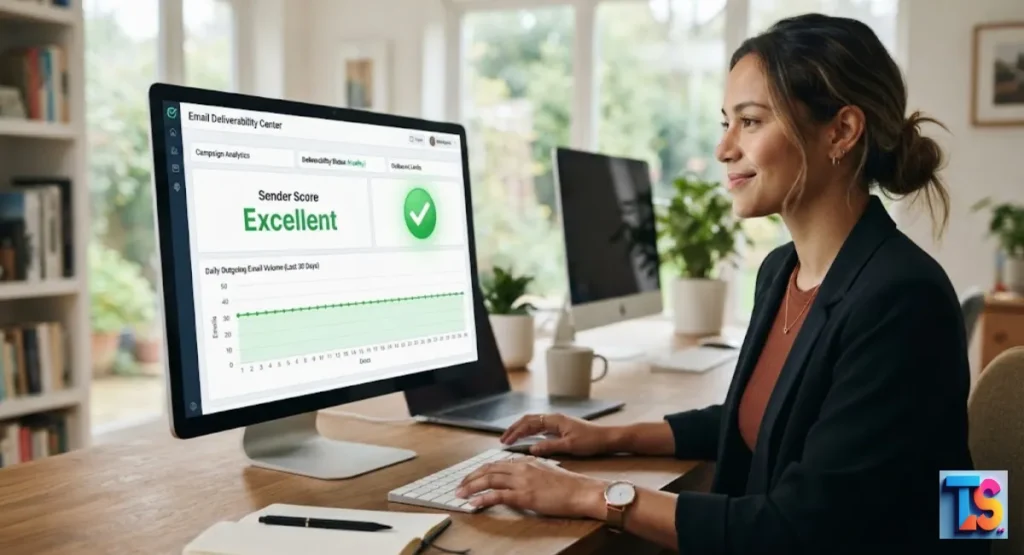
Are you worried about your messages hitting the spam folder? Finding the right Cold Email Limits Per Workspace is the secret to protecting your domain score. Sending thousands of messages overnight will instantly ruin your account.
But staying under a safe cap keeps your messages going to the primary inbox instead of the junk folder. You must remember that Cold Outreach & Deliverability depends entirely on your daily volume patterns.
If you send too much, algorithms will block you. But if you keep it steady, your business will grow safely. Here is how you can set up your accounts for long-term success.
What is the Safe Daily Limit for Cold Email?
For a healthy, professional Google Workspace account in 2026, the safe limit for cold outreach is 40 to 50 emails per day per inbox. While providers technically allow more, staying under 50 ensures your domain reputation remains high and avoids triggering modern filters.
Consistency matters more than volume; sending 50 high-quality emails daily is safer.
The goal of cold outreach is to ensure messages reach the primary inbox. If you send too many messages too quickly, providers label your account as a spammer.
By keeping your daily volume modest, you maintain a positive sender score, which keeps your outreach effective and your primary domain safe from permanent blacklisting by major email providers.
Official Google Workspace Limits vs. Realistic Cold Email Limits
Understanding the difference between technical capacity and safe outreach limits is vital for your domain health. While software might allow for high numbers, service providers prioritize the experience of the recipient.
You must balance your outreach goals with strict safety standards to keep your accounts active and ensure your messages land in the main inbox.
Understanding Google’s 2,000/Day Capacity
Google Workspace officially states that users can send up to 2,000 emails per day. This number is intended for internal communication or marketing to people who have already opted in to receive your messages.
It is not designed for cold outreach, where recipients have not explicitly requested contact from your specific domain or business entity.
This capacity exists to support large organizations sending internal updates. However, attempting to use this full limit for cold outreach triggers automated 2026 security protocols.
If you send too many unsolicited messages, Google identifies this as a violation of their bulk sender policies, which can lead to your account being restricted or suspended very quickly.
Why “Max Capacity” is the Fastest Way to Get Blacklisted
Sending 2,000 cold emails from one inbox will cause your account to be flagged within hours. Spam filters look for sudden spikes in volume.
When a low-volume account suddenly hits high numbers, algorithms assume the account is compromised, leading to an immediate block to protect the network from potential malicious and unwanted spam activity.
Systems now use advanced behavior tracking to monitor account patterns. When an account shifts from 10 emails to 2,000, it triggers an instant penalty.
This is a common mistake that leads to domain blacklisting. You must always scale slowly to prove to the system that you are a real person with a legitimate, trusted business.
The Hidden Deliverability Thresholds in 2026
In 2026, email providers use sophisticated technology to analyze sender behavior. These systems track hidden metrics such as how many recipients mark your mail as spam or how many ignore your messages.
Even if you stay under 2,000, sending 100 cold emails to uninterested people destroys your reputation. Modern filters prioritize engagement, not just capacity.
Google now looks closely at user-reported spam rates. If your percentage of spam reports crosses a very low threshold, your emails start landing in the junk folder for everyone.
Because these systems are automated, they react instantly. Protecting your domain means sending fewer emails to higher-quality lists, ensuring that recipients actually want your messages.
Critical Variables That Set Your Personal Sending Cap
Your specific sending limit is not a fixed number for every user but depends on several key reputation metrics. Factors like domain age, your technical authentication setup, and recipient interaction history all influence how many emails you can safely send.
Monitoring these variables helps you determine the correct volume for your specific account setup.
Domain Age and Reputation History
A brand-new domain is fragile and requires careful handling to build trust. If your domain is less than six months old, you should start with even lower limits, such as 20 emails per day.
Older domains with a long history of positive, non-spam activity can handle closer to 50 emails, provided they have maintained consistent engagement.
You can verify your standing by checking your sender reputation in Postmaster Tools. If your domain has been used for spam in the past, it will take months of low-volume, high-quality sending to repair it.
Always treat a new domain as a blank slate that needs to earn its authority through steady, respectful outreach habits.
Inbox Warm-up Status and Consistency
An inbox that has gone through a structured warm-up process is significantly more resilient. Consistency is the secret to scaling your daily outreach. If you send 50 emails every single day without fail, your reputation stays stable.
If you send 500 one day and zero the next, you will trigger spam alerts and provider restrictions.
Warm-up services automatically interact with your emails to show providers that people value your content. This process builds a positive history. In 2026, providers are very sensitive to uneven sending patterns.
Whether you are using a tool or manual methods, your goal is to show the same predictable activity level every single business day.
Your Unique Bounce and Spam Complaint Rates
Your personal sending cap is dictated by how recipients react to your mail. If your bounce rate exceeds 2% or your spam complaint rate climbs above 0.1%, your safe limit drops to zero instantly.
Monitoring your feedback loops is the only way to know if you are pushing your account too hard or facing issues.
High bounce rates happen when your list contains old or incorrect email addresses. This tells Google that you are not managing your list properly. If you notice a high bounce rate, stop sending immediately.
You must clean your list to protect your sender reputation. A clean list is the most important factor in keeping your daily limit safe.
Technical Authentication (SPF, DKIM, and DMARC Alignment)
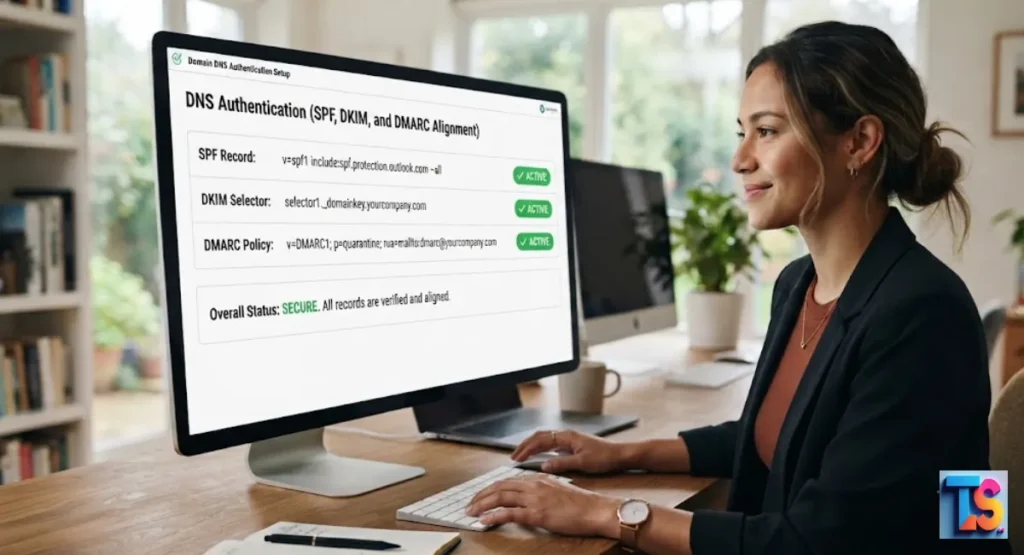
Your sending limits are meaningless if your technical setup is weak. You must have perfect SPF, DKIM, and DMARC records configured. These records act as your digital ID card.
Without them, Google and other providers will treat any volume of mail as suspicious, regardless of how few emails you send during the day.
If you are concerned about security, you might also wonder how to check if outlook email has been hacked. Always ensure your account has two-factor authentication enabled and that your DNS settings are locked.
Proper authentication prevents bad actors from using your domain to send spam, which keeps your reputation clean and your deliverability high.
How to Calculate Your Ideal Daily Volume
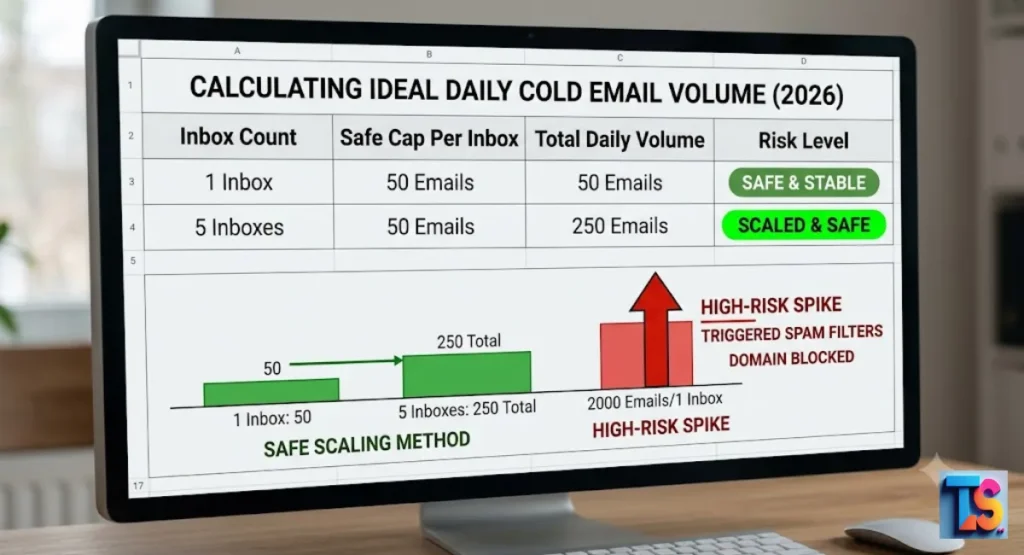
Calculating your daily sending volume requires a simple approach based on the number of active inboxes you manage. By using the standard ratio of fifty emails for every one workspace, you ensure that your total outreach remains within safe limits.
Use this systematic math to scale your efforts without risking your sender reputation.
| Number of Inboxes | Safe Daily Cap per Inbox | Total Daily Capacity |
| 1 Inbox | 50 Emails | 50 Emails |
| 5 Inboxes | 50 Emails | 250 Emails |
| 10 Inboxes | 50 Emails | 500 Emails |
If you need to send more than 50 emails, do not increase the limit on one inbox. Instead, add another inbox. This is the safest way to scale.
By keeping each inbox at or below 50 messages, you distribute the risk and ensure that your deliverability remains excellent, even if one specific account hits a temporary hurdle.
Why Scaling by Inbox Count Beats Pushing One Account
Scaling by using more inboxes is safer than trying to send high volumes from a single account. If your business requires 500 cold emails per day, do not try to squeeze them into one inbox.
Instead, use 10 separate, authenticated inboxes. Spreading the load reduces the risk to your main company domain every day.
Using multiple inboxes is a professional strategy that protects your brand. If one inbox gets flagged, the others remain operational.
This allows you to continue your work while you fix the issue with the restricted account. It is the most robust way to build a reliable, high-volume, and safe cold email infrastructure for your business.
Managing Follow-ups: Do They Count Toward Your Daily Limit?
Yes, every single email counts. Follow-ups are still outgoing messages from your server. If you send 30 new cold emails and 20 follow-ups, you have reached your 50-email daily limit.
Many people fail to account for follow-up volume, which causes their total daily activity to spiral past safe levels without them realizing it or intending it.
When you plan your daily schedule, include both your new leads and your follow-up sequence. It is easy to lose track when using automation tools. Always check your total sent count in your dashboard.
Keeping the combined total under 50 ensures your activity looks natural and stays within the safe zone for your Google Workspace account.
The Anatomy of a Safe Sending Ramp-Up Schedule
Establishing a safe ramp-up schedule is necessary to build domain authority and avoid early account bans. You must start small and increase your volume very slowly as your reputation grows.
Following this structured timeline ensures that providers view your account as a legitimate, trusted entity rather than a source of automated or unwanted spam mail.
Week 1: Foundation and Initial Warm-up
In the first week, focus purely on warming the inbox. Send 5 to 10 emails per day to accounts that you know will open and reply to them. This creates a history of positive interactions.
Do not send any true cold outreach during these first seven days to protect your domain and build initial trust.
- Goal: Establish a baseline reputation.
- Action: Send 5-10 messages daily to known contacts.
- Result: Create a history of positive engagement signals.
During this week, use a warm-up tool to generate natural interactions. The goal is to establish a pattern of sending and receiving. By the end of week one, your account should have a small but solid history of engagement.
This makes it much easier to increase your volume in the following weeks without triggering spam filters.
Week 2–4: Incremental Volume Increases
If your engagement remains high, increase your volume by 5 to 10 emails per day each week. By the end of month one, you should be comfortably hitting 40 to 50 emails.
Watch your metrics closely during this period. If you see a dip in deliverability, pause the increases and hold your current volume steady.
- Growth: Increase by 5-10 messages per week.
- Monitoring: Check open rates daily.
- Limit: Do not exceed 50 messages per day per inbox.
It is better to take five weeks to reach your goal than to have your domain banned for moving too fast. Monitor your open rates every morning.
If they stay consistent, you are on the right path. This slow, steady approach tells Google that you are a real user who is slowly ramping up legitimate business communication.
Identifying Your “Stop-Sending” Signal
Your stop-sending signal is any notification of a delivery failure or a sudden drop in open rates. If your emails start going to the spam folder, stop all outreach immediately.
Continuing to push volume when you know your deliverability is failing will result in a permanent blacklist of your domain and hurt your business brand.
- Signal 1: Any bounce or delivery failure message.
- Signal 2: Open rates dropping below 20 percent.
- Signal 3: Emails landing directly in spam folders.
If you experience this, you must investigate the cause. Check your DNS records, review your content, and look at your bounce reports. Fix the issues before attempting to send again.
Sometimes a quick pause for a few days is all it takes to reset your reputation. Never ignore these clear warnings from the mail servers.
Strategic Infrastructure for Scaling Cold Outreach
Creating a robust infrastructure is critical for long-term growth and protecting your main business domain from unnecessary risk. You should separate your outreach efforts from your primary company communications to maintain a clean record.
Implementing these professional strategies keeps your operations stable even as you increase the number of messages you send on a daily basis.
Why Professional Cold Emailers Use Multiple Domains
Scaling requires protecting your primary brand. Professional teams often register lookalike domains for outreach, such as get[company].com instead of [company].com.
This keeps your main corporate email address, name@[company].com, completely separated from the risks associated with cold outreach. If an outreach domain encounters a reputation issue, your main company domain remains clean and safe for all clients.
This strategy is common in 2026 to ensure long-term stability. Your main domain should be reserved for high-value communication with existing clients and partners.
By isolating your cold outreach traffic, you create a dedicated infrastructure that keeps your business communication flowing even if your lead generation efforts hit a temporary snag or a high spam rate.
Domain Rotation Strategies for High-Volume Needs
When you need to send thousands of emails, use a rotation strategy. This involves cycling through a portfolio of domains and inboxes.
By spreading your volume across multiple unique domains, you prevent any single domain from being flagged by spam filters, ensuring your infrastructure stays healthy and your campaigns reach the target audience in their primary inbox.
Rotate your domains regularly to prevent any single one from carrying too much load. This prevents the reputation-burning that happens when one domain sends too much mail. It also helps you identify which domains are performing best.
This is a highly effective way to manage large-scale outreach while maintaining excellent deliverability and protecting your sender score.
Managing Multiple Workspaces Without Cross-Contamination
If you manage several workspaces, ensure they are technically isolated. Do not link them to the same recovery phone numbers or secondary email addresses if possible.
If one account gets flagged, you do not want spam filters to automatically blacklist every other account connected to your identity. Keep your accounts independent for the best results and security.
Each workspace should be treated as a separate entity. Use different browsers or dedicated profiles when logging into these accounts.
This prevents any accidental data sharing that might alert providers to the fact that you are managing a large network. By keeping these workspaces separate, you ensure that one minor issue does not bring down your entire outreach operation.
Early Warning Signs You Are Sending Too Many Emails
Identifying early warning signs allows you to adjust your strategy before your reputation is permanently damaged. You must actively monitor your performance metrics for any changes that might signal an issue with your volume or content quality.
Taking quick action when you notice these signs is the best way to keep your sending capacity healthy.
Declining Open Rates and Engagement
The first sign of trouble is a downward trend in open rates. If you usually see a 30% open rate and it suddenly drops to 10%, your emails are likely being filtered into the spam or Promotions folder.
This is a direct signal that your current volume or content is being viewed as unwanted by recipients.
When this happens, you should also Fix Dropping Open Rates After Bulk Scraping by double-checking your lead source. Often, a drop in performance is caused by a bad list of emails that were not verified properly.
Clean your list, remove the low-quality leads, and reduce your volume until your open rates recover to their normal, healthy levels.
How to Monitor Your Postmaster Tools Data
Google Postmaster Tools is essential for any sender. It provides data on your domain reputation and IP reputation. If you see your reputation drop from High to Medium or Low, you are sending too much or your content is triggering spam filters.
Check this dashboard at least once per week to stay ahead of any potential issues.
This tool gives you the same data that Google uses to filter your mail. It is the most accurate way to understand your standing. If your reputation is low, stop your outreach and focus on repairing your sender profile.
You can only safely increase your volume once the data shows your domain reputation has fully returned to High.
What to Do Immediately If You Get a 421 or 452 Error
A 421 or 452 error means the server is temporarily refusing your mail. This is an explicit warning that you are sending too fast. Stop all outgoing emails immediately for at least 48 hours.
Use this time to check your authentication settings and verify that your list does not contain invalid addresses that trigger these specific errors.
These errors are system-level “slow down” requests. If you ignore them, you risk a permanent ban. After 48 hours, resume at a very low volume and see if the errors continue.
If they persist, your sender reputation needs more time to recover. Always prioritize compliance with these error signals to keep your account active and healthy.
Best Practices for Maintaining Deliverability in 2026
Modern email delivery requires consistent attention to best practices that keep your sender score high and your emails out of the spam folder. By focusing on list quality and personalized content, you ensure that your messages provide value and maintain positive engagement.
These habits are essential for anyone wanting long-term, reliable results in their outreach campaigns.
Prioritizing List Hygiene and Verification
Never send an email to an unverified address. Use a high-quality verification tool to remove dead emails and catch-all addresses before you ever add them to your outreach sequence.
Sending even a small percentage of emails to non-existent addresses will cause ISPs to mark your domain as low-quality and penalize your ability to reach real people.
List hygiene is the most important part of cold email today. If you have too many invalid emails, your bounce rate climbs and your sender reputation falls. Verify every lead before it touches your inbox.
This simple step ensures that your emails land in the primary inbox rather than being blocked by the receiving server for invalid contact data.
Writing High-CTR Content That Actually Gets Replies
In 2026, content must be hyper-personalized. If you send the same generic template to 50 people, they are more likely to hit the mark as spam button.
Write emails that solve a specific problem for the recipient. When people reply to your email, it signals to Google that your communication is valuable and keeps your deliverability high.
You should always aim to Write Low-Spam-Score Cold Emails by avoiding sales-heavy language and excessive links. Focus on being helpful and starting a conversation rather than closing a deal in the first message.
When recipients engage with you, it proves your value to the algorithm, which is the best way to ensure your future emails remain successful.
Balancing Automation with Human-Like Sending Patterns
Avoid using bots that send emails at exact intervals, like every 60 seconds. Humans send emails at random times. Use tools that randomize the delay between messages to mimic a real person working at a desk.
This makes your activity look natural to security algorithms and prevents you from being flagged for suspicious, robotic behavior.
Real human behavior is messy and unpredictable. Your sending schedule should reflect that. By using random delays, you ensure that your activity pattern matches a real human.
This is a critical detail in 2026 because automated systems are better than ever at spotting bot activity. Keep it natural to keep your account safe and your deliverability at its peak.
FAQs
Can I use aliases to increase my sending limits?
No. Aliases are just different addresses that point to the same inbox. They do not increase your technical capacity or bypass security limits set by Google. Using them as a way to send more mail will actually trigger spam filters faster, as the system identifies the source of the traffic regardless of the alias name used.
Does the Gmail “5,000 per day” bulk sender rule apply to me?
That rule applies to senders who send more than 5,000 messages per day to Gmail addresses. It involves strict technical requirements like one-click unsubscribes. While you should follow these best practices anyway, you should stay far below that volume for cold outreach to avoid being treated as a bulk sender, which has much stricter deliverability requirements.
How long should I warm up a new Google Workspace inbox?
You should warm up a new inbox for a minimum of 14 to 21 days before sending any cold outreach. Patience in this phase prevents long-term reputation issues. Spending three weeks warming your account is a small price to pay for a lifetime of stable deliverability. Never rush the setup phase of a new business email account.
What happens if Google permanently bans my sending domain?
If your domain is permanently banned, you will be unable to send emails to anyone using Gmail or Google Workspace. You will need to purchase a new domain and start the reputation-building process from scratch. This can hurt your business growth for months, which is why following these safe limits is so vital for your long-term success.
Should I send all my emails in the morning or spread them out?
Always spread your emails throughout the day. Spiking all your volume at 9:00 AM looks like robotic, automated behavior. Spacing them out over eight or more hours looks like natural human activity. This simple habit keeps your account safe and ensures your emails do not look suspicious to the smart spam filters that monitor your traffic.
The Bottom Line
That keeping your outreach safe means respecting the modern filters. Watch your metrics, space your messages out, and protect your domain reputation above all else.