Every business relies on files to make smart choices, but how you gather that info affects your profits. Relying on teams to type facts by hand creates massive system delays and lowers your output.
To increase your numbers, you must evaluate your manual vs automated data extraction ROI to see where you are losing money. Modern teams use intelligent automation tools to change this slow daily chore into a fast background routine.
Upgrading to a digital document processing setup slashes your expenses and stops typing mistakes. This deep financial breakdown reveals the true value of modern workflow efficiency to help you scale your business systems securely.
Understanding Data Extraction: Manual vs. Automated Fundamentals
What is Data Extraction and Why Does It Impact Your Bottom Line?
Data extraction means pulling key details from documents and websites and saving them safely. Manual extraction slows your work and causes typing mistakes, which directly hurts total company profits.
Automated extraction drops your expenses, helps your staff work faster, and protects your money, meaning you can handle more work without increasing your payroll costs.
When your business receives invoices, shipping forms, or customer orders, that information must go into your software systems. If your team spends hours copying text, your business loses valuable time.
Fast and accurate data processing keeps your clients happy and helps your company grow without adding extra staff.
The Reality of Manual Data Extraction in Modern Workflows
Manual data extraction relies on human workers to read papers and type text into databases. This slow method creates big system delays because people can only type so fast.
When your company gets busy, your workers fall behind, which leads to late vendor fees, stressed employees, and slow help for your global customers who need fast support.
Key Trend: Studies show that teams relying on human data entry spend up to a third of their workweek simply copying information between systems instead of focusing on growth tasks.
What is Automated Data Extraction (AI & Agentic Workflows)?
Automated data extraction uses smart software programs to scan documents, pull out facts, and paste them into your systems. Modern systems use smart pattern recognition to read invoices and receipts without human help.
This moves data capture from a slow daily chore into an instant background routine that updates your entire corporate database automatically and securely.
Modern digital workflows rely on this fast approach to keep records completely accurate. By removing the need for physical data entry, your staff can focus on looking at insights rather than typing lines of numbers.
This automation helps your company complete daily tracking work smoothly and increases overall output.
The True Cost of Sticking to Manual Data Extraction
Direct Labor Costs vs. Fully Loaded Employee Rates
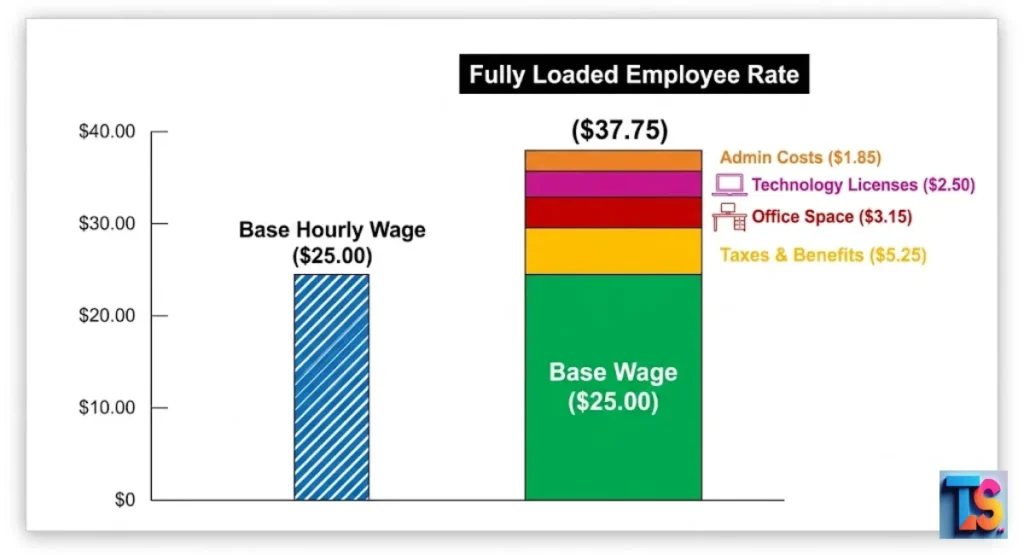
Direct labor costs only include the hourly wage you pay an employee to enter data. Fully loaded rates include taxes, office space, software licenses, healthcare, and benefits.
When you calculate the fully loaded rate, manual data entry often costs twice as much as the base hourly wage, drastically lowering your overall company savings and reducing profit margins over time.
Cost Component Base Wage Only Fully Loaded Rate (Real Cost)
Hourly Pay $22.00 $22.00
Benefits & Insurance $0.00 $6.50
Office Space & Tech $0.00 $4.00
Taxes & Overhead $0.00 $3.50
Total Hourly Cost $22.00 $36.00
The 1–4% Error Rate: How Manual Inaccuracies Cascade into Financial Losses
Human data entry naturally carries an error rate between 1% and 4%. A single misplaced decimal point or wrong account number can ruin inventory counts, trigger incorrect vendor payments, or cause compliance fines.
Fixing these mistakes requires extra labor hours, which quickly doubles the cost of the original work for your business and disrupts operations.
These hidden costs multiply across your various departments and damage vendor trust. When your team spends days tracking down a simple typing mistake, your primary projects stop completely.
This error cycle strains your internal resources and costs your organization thousands of dollars in lost processing time.
The “Scavenger Tax”: Time Lost to Searching, Validating, and Re-keying Data
The scavenger tax is the time your team wastes hunting for missing forms, verifying numbers, and re-typing messy text. This lost time stops your normal business operations and lowers workflow efficiency.
Instead of serving customers, your smart staff members act like paper detectives, searching for lost information across scattered computer folders every single day.
When employees spend hours matching files by hand, overall company momentum drops. This continuous searching frustrates your workers and delays important business decisions.
Removing this tax through software lets your personnel spend their time on profitable tasks that grow your brand.
Infrastructure Bottlenecks and Zero Scalability
Manual workflows cannot scale up when your business experiences a sudden spike in orders or clients. Your options are restricted to hiring expensive temporary workers or letting your system backlog grow.
This lack of flexibility creates a strict operational wall that prevents your company from growing into new economic markets quickly and efficiently without friction.
Your delivery times slow down, and your customer service reviews drop when systems block progress. A manual process cannot handle thousands of new papers without causing severe operational stress.
True business growth requires flexible tools that expand instantly to meet market demands.
Breaking Down the ROI of Automated Data Extraction
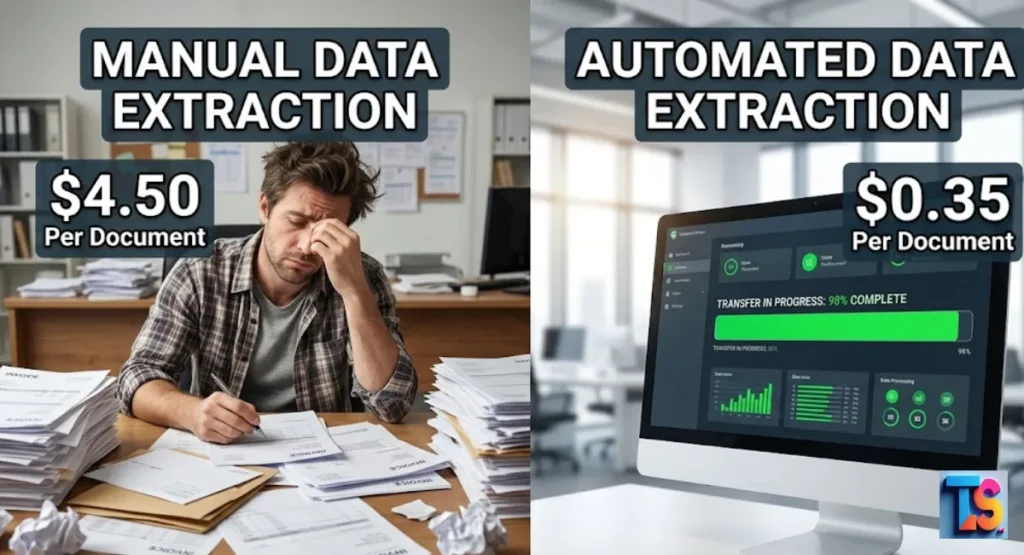
75% to 92% Reduction in Cost Per Document
Switching to digital tools lowers document processing costs by 75% to 92% compared to manual typing. Instead of paying dollars for human labor on every single form, software processes the pages for pennies.
These savings add up quickly, allowing smart business owners to get their original technology investment back within a few short months.
Manual Cost per Document: $4.50
Automated Cost per Document: $0.35
Compression of Processing Time: From 12 Minutes to 2 Seconds
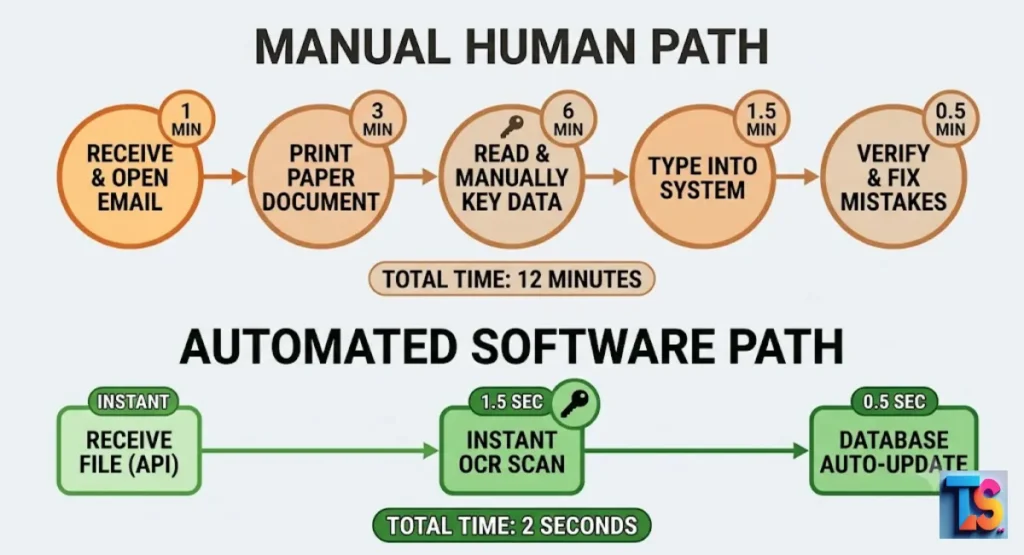
An employee takes about 12 minutes to read, verify, and type data from a complex business form. Intelligent software completes this exact task in just 2 seconds.
This rapid speed eliminates processing delays, keeps your databases updated in real time, and helps your customer service team answer client requests almost instantly without any system lag.
This shift helps your logistics team ship orders faster and keeps production moving. When you cut your document handling time down to zero, your entire business lifecycle speeds up.
Fast processing gives you a strong edge over slower competitors in your field.
Accuracy Multiplication: Reaching 99.5%+ with Intelligent Automation
Modern automated tools consistently achieve accuracy levels above 99.5% because software does not get tired or distracted. By removing human error, your business avoids the expensive downstream corrections that hurt your profitability and disrupt client relationships.
This shift ensures high data quality across your entire system without extra verification steps from your team.
Clean databases lead to reliable financial reporting and fewer disputes with your suppliers. When your data is correct from the start, your management team can make strategic moves with total confidence.
High accuracy protects your brand reputation and keeps your clients happy.
Linear Scalability: Handling Volume Spikes Without Increasing Headcount
Automated systems allow you to scale your operations instantly without hiring more staff. Whether you need to process 100 documents or 10,000 documents a day, the software handles the volume seamlessly.
This elasticity ensures your operating expenses remain predictable and steady during peak business seasons, protecting your bottom line from unexpected labor spikes.
Your business can take on massive new contracts without worrying about administrative limits. The software handles extra work without requiring more office space or management oversight.
This feature turns data management into a highly predictable utility for your business.
The Core ROI Calculation Model: How to Measure the Value
Step 1: Define Your Loaded Manual Baseline (Time + Wage + Overhead)
To find your baseline cost, multiply the hours your team spends on data entry by their fully loaded hourly wage. Make sure to include all extra operational costs like physical office space and software licenses.
This total tells you the exact amount of money you spend each month to keep manual workflows running inside your business.
Gathering these data points gives you a realistic view of your current administrative expenses. Many leaders find that their real entry costs are much higher than they thought. Knowing this baseline number is the first step toward optimization.
Step 2: Quantify the Cost of Data Errors and Rework Time
Track your monthly database errors and calculate the exact hours needed to find and fix them. Multiply those repair hours by the fully loaded worker wage to see the real damage. Add any external costs like compliance penalties, vendor late fees, or lost client revenue to discover the true financial impact of human mistakes over time.
Mistakes slow down your delivery speed and irritate your main business partners. By putting a clear dollar value on these errors, you understand the cost of sticking with old systems.
This calculation shows the true price of manual data entries.
Step 3: Account for Implementation Costs and Hidden Automation Expenses
A complete financial return model must include the software subscription fees, initial setup costs, and team training hours. You should also factor in any minor ongoing maintenance costs needed to update your workflows.
Comparing these expenses against your labor savings reveals your net benefit, ensuring you make an informed decision for your core operations.
This step ensures your financial plan remains honest and realistic for your board members. Every new tool takes a bit of time and money to launch correctly.
Tracking these details prevents surprise expenses during your system upgrade.
Step 4: Apply the Global Data Automation ROI Formula
To find your return on investment percentage, subtract your total annual automation costs from your annual manual savings, then divide that number by the total automation costs.
This clear math gives your leadership team deep visibility into the long-term benefits of upgrading your business document systems to modern software tools instantly.
$$ROI = \left( \frac{\text{Annual Manual Savings} – \text{Annual Automation Costs}}{\text{Annual Automation Costs}} \right) \times 100$$
This simple calculation gives you the exact financial return percentage for your business case.
Real-World ROI Benchmarks Across Major Industries
Accounts Payable & Finance: Automated Invoice Processing Gains
Finance departments see fast cost drops when they automate invoice data capture. Removing manual typing lowers processing costs from $12 per invoice to under $2.
Businesses can also apply these data practices to learn how to personalize 1000 cold emails using dynamic data variables, which increases response rates and vendor engagement across your market.
This upgrade allows your accounting team to close the monthly books much faster. It stops manual ledger mistakes and ensures your tax filings remain accurate. Better invoice flows strengthen your supplier network and protect your corporate cash flow.
Healthcare & DME Workflows: Reducing Compliance Risks and Processing Backlogs
Medical offices use automated tools to pull patient details from insurance forms and doctor notes. This shift cuts down on processing backlogs and speeds up patient care.
Reducing data entry mistakes also protects providers from costly insurance denials, medical audit compliance violations, and unexpected operational expenses that drain important clinic resources.
Faster entry means patients get their medical equipment and treatments without long delays. It reduces the stress on your billing staff and improves clinic ratings.
Automation keeps your healthcare facility organized and audit-ready.
Legal & Procurement: Accelerating Contract Extraction and Quote Comparison
Legal and purchasing teams use automated extraction to pull values from vendor bids and long contracts instantly. This fast access helps firms update corporate websites with fresh insights.
Applying these tools shows you how to make your B2B software show up in AI search answers without difficulty.
Corporate buyers use these tools to check prices across dozens of suppliers simultaneously. It prevents your company from signing contracts with unfavorable hidden terms.
This speed lets your legal team close deals ahead of schedule.
E-Commerce & Product Data Management: Elimination of “Pricing Flash Crashes”
Online stores use automated extraction to update thousands of items, descriptions, and supplier prices across their websites. This strategy builds a strong AI-Driven Sales & Next-Gen Outreach ROI by keeping price records correct.
It also protects online storefronts from pricing mistakes that hurt profit margins during busy sales seasons when volume spikes occur.
When supplier inventory changes, your website updates its catalog automatically to match. This stops you from accidentally selling out-of-stock items to your shoppers.
Clean product data improves your overall online shopping experience.
Choosing Your Path: Decision Framework for 2026
When to Prioritize Manual Data Extraction
Manual extraction is best if you process fewer than 50 forms a month and document formats change constantly. If software setup costs are higher than the wages you save, keeping human entry makes sense.
It protects short-term cash flow for small operations that do not have large backlogs of incoming data needing processing.
Small startups often use manual steps while they test their early business models. When your data volume is low, human flexibility beats software setup times.
Keep things manual until your team spends too many hours on data entry chores.
When Automated Extraction is Non-Negotiable
Automation is required if your business processes hundreds of forms, faces tight daily deadlines, or risks big fines for data mistakes. When typing chores stop your team from doing higher-value tasks, software becomes mandatory. This change helps your company stay fast, agile, and competitive in modern digital search markets around the world.
If your administration costs rise every time you gain a new client, you must automate. Relying on hand entry scales poorly and caps your maximum business revenue.
Modern companies use automated tools to keep their operations lean and fast.
The Hybrid Model: Leveraging Human-in-the-Loop for Edge Cases
The hybrid approach combines automated software speed with human oversight for the best results. The software processes most files instantly but sends low-confidence or blurry images to an employee for review.
This workflow keeps your total system costs low while maintaining perfect accuracy on tricky or unusual business documents that enter your pipeline.
This layout gives you the best of both worlds by combining speed with human intelligence. Your staff only steps in when the software highlights a complex problem.
This setup saves massive amounts of time while keeping your records completely clean.
FAQs
How quickly does automated data extraction software pay for itself?
Most businesses see full financial payback within three to six months after launching automated tools. Your exact timeline depends on your monthly document volume and current employee labor rates. High-volume teams save money much faster because they eliminate large amounts of slow, manual data entry on their daily business forms almost immediately upon setup.
Smaller companies might take slightly longer to see a full return on their software. However, the steady drop in errors and the speed gains provide value from day one. Over time, these savings create a more stable financial position.
What hidden costs should be included in an automation ROI model?
Your ROI model must include internal employee training hours, custom software connections, and unexpected updates for new document layouts. Factoring in these minor expenses alongside your software subscription ensures your long-term return calculations remain realistic, accurate, and completely dependable for company leadership teams looking to upgrade.
You should also plan for minimal ongoing support costs from your technology providers. Reviewing these facts protects your corporate budget from surprises later on. A complete model sets up your project for true administrative success.
Does implementing extraction automation mean cutting team headcount?
Automation software rarely requires laying off workers from your company. Instead, it handles the boring typing chores so your employees can work on more important tasks like customer support or data analysis. This allows your business to scale its operations smoothly without needing to hire more people during growth phases.
Most workers feel relieved when you remove tedious data entry tasks from their daily schedules. It improves employee retention and lets your team focus on creative problem-solving. Automation makes your current workspace more productive and interesting.
How do you measure extraction accuracy benchmarking post-go-live?
Compare a random sample of software-extracted data fields against the source documents every month. Track how many errors slip through and monitor how often human staff must step in to fix files. This regular audit verifies your software is hitting its accuracy targets consistently over time.
Share these quality scores with your team to keep everyone aligned on system performance. If accuracy drops on specific forms, you can tune your templates to fix the issue. Continuous tracking ensures your database stays completely reliable.
What is the cost of not automating data extraction yet?
Waiting to automate means your business keeps incurring high labor costs, slow document turnaround times, and recurring typing errors. Competitors using modern automated systems will work faster and keep their overhead low. Over time, sticking to manual processes hurts your market position and significantly lowers your corporate profit margins.
Your staff will stay bogged down by paperwork while your rivals launch fast digital solutions. Delaying this upgrade makes it harder to recruit top talent who prefer modern tools. Sticking with manual workflows limits your market potential.
The Bottom Line
Continuing with manual data extraction subjects your business to unnecessary overhead, high error rates, and operational delays. Transitioning to an automated framework lowers your processing costs, improves document accuracy, and frees your team to focus on growth. Use the calculations outlined in this guide to evaluate your workflows, measure potential savings, and build a highly profitable automated system.