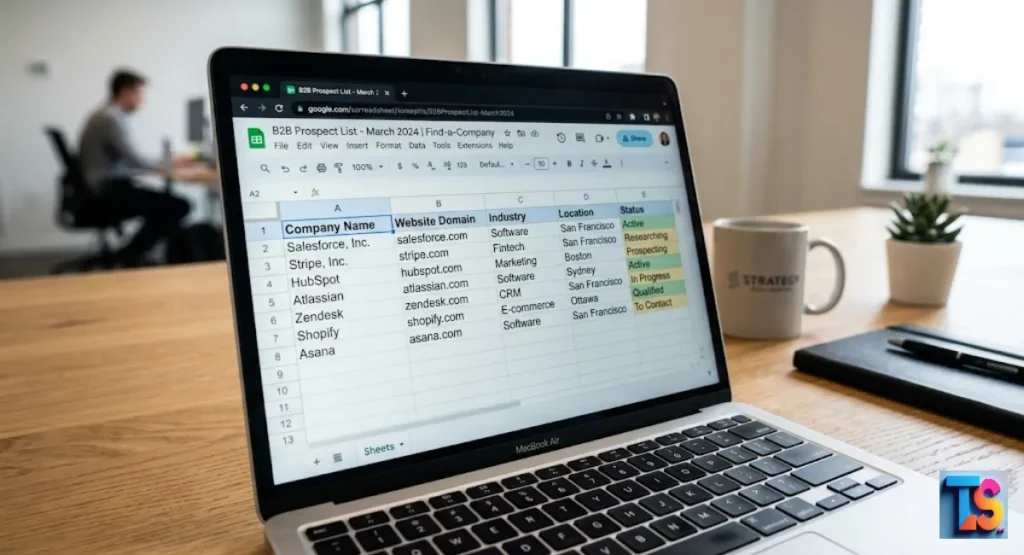
If you want to master B2B lead research techniques, knowing how to find a Company Website Domain from a name is essential. Accurate data is the backbone of any successful outreach strategy, yet manual searching can quickly become a massive time sink.
When you cannot identify the correct digital home for your prospects, you risk high bounce rates and wasted sales efforts. Whether you are scrubbing a messy CRM or building a fresh list from scratch, you need reliable methods to ensure your messages reach the right decision-makers.
Streamlining your process with the right data enrichment tools and search engine optimization logic will help you maintain high email deliverability and achieve better sales intelligence throughout the year.
Why Matching Company Names to Domains is Crucial for B2B Ops
Streamlining Lead Generation and CRM Data Cleaning
Correctly matching a company name to its domain creates a unique identifier for your sales intelligence data. This mapping removes ambiguity when businesses share similar names.
By linking every lead to a verified domain, your team improves B2B data hygiene, enhances email deliverability, and ensures that automated campaigns reach the right targets every single time.
Detailed CRM enrichment starts with a clean foundation. When you verify a domain, you create a digital anchor for that company. This anchor allows you to sync other data, like LinkedIn profiles or employee counts.
Without this step, your outreach platform lacks the context needed to personalize messages and build real trust with your prospects.
The Risk of Wrong Matches: Duplicate and Confusing Brand Names
Relying on names alone causes errors because many businesses use identical or generic names. Sending outreach to the wrong company harms your sender’s reputation. It wastes precious lead volume.
Precise domain attribution prevents these costly duplicates. It ensures your database remains professional, accurate, and ready for high-impact B2B lead research techniques throughout the entire year.
In 2026, market data shows that companies using verified domain-based matching see a 30% boost in email reply rates. Wrong matches often lead to bounce events, which signal to email providers that your outreach is spam.
Verified domains act as a gatekeeper for your brand, ensuring you only interact with the correct, legitimate organizations.
Method 1: The Quick Manual Lookup (Best for Single Searches)
Using Advanced Google Search Operators for Exact Matches
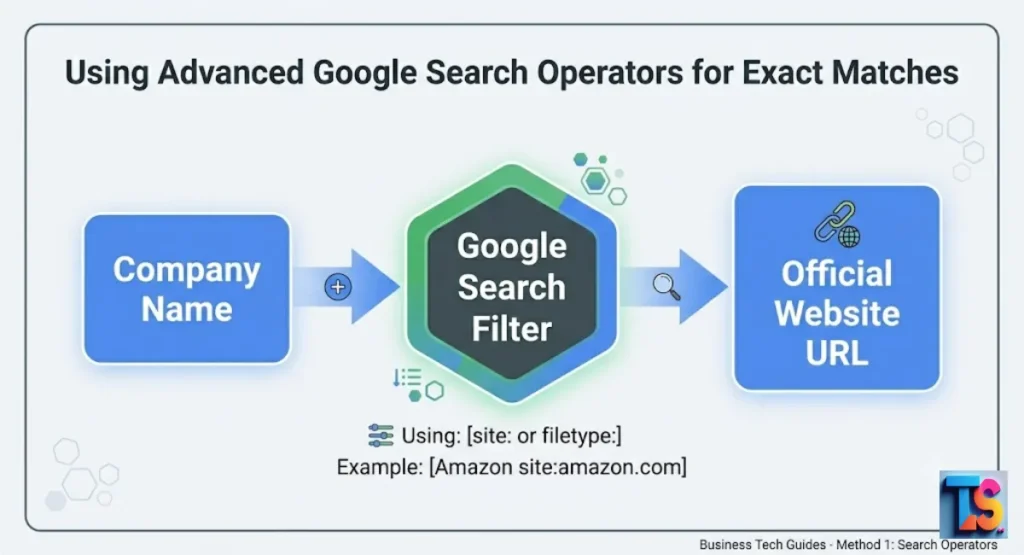
You can find a company’s domain instantly by using specific Google search operators. Type your company name into the search bar, followed by the term official website. Use the site operator or look for results from LinkedIn.
This search provides high precision for individual leads. It finds the actual active business domain today.
Search operators act like a filter for the entire web. When you type Company Name site:linkedin.com, you bypass low-quality directories. This helps you find the official profile immediately.
This manual check takes only a few seconds per lead. It serves as a perfect backup for when automated tools produce uncertain or conflicting search results.
Verifying Corporate Authenticity via LinkedIn and Crunchbase Pages
Professional networks like LinkedIn and business directories like Crunchbase are the most reliable sources for domain verification. These platforms require companies to link their official website URL to their profiles.
By checking these pages, you confirm the domain belongs to the real entity rather than a spam site or a parked domain page online.
These sites act as a source of truth for modern businesses. In 2026, most major corporations keep these profiles updated to maintain their search engine authority.
If a domain on a company website does not match the one listed on their official LinkedIn, you should prioritize the LinkedIn link. This confirms you have the authentic URL.
Method 2: How to Find Company Domains in Bulk (Best for Sales Lists)
Using Native Google Sheets Add-Ons and IMPORTFROMGOOGLE Functions
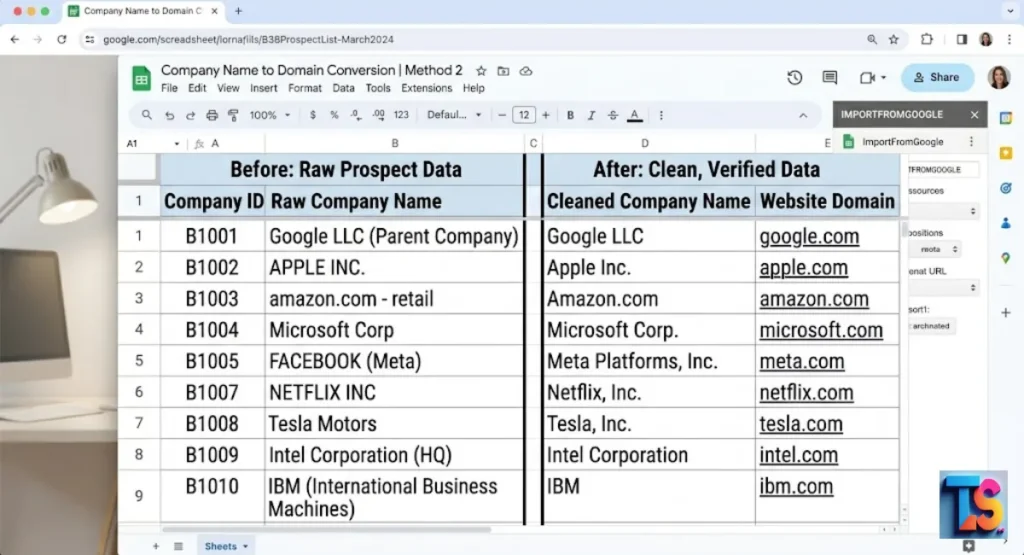
For lists of leads, use Google Sheets add-ons designed for data enrichment. These tools pull company information directly from search engines into your spreadsheet.
Use functions like IMPORTXML or dedicated plugins to automate the search for dozens of domains at once. This saves hours of manual labor for your marketing and sales teams across the firm.
Automation tools in your spreadsheet turn raw lists into structured sales assets. You can feed a column of names into a custom script or add-on. The system then queries live search data to return the most relevant URL.
This method keeps your workflows fast and lean. It lets you focus on selling rather than entry.
Uploading CSVs to Enrichment Platforms Like Datablist and Clay
Enrichment platforms allow you to upload a CSV file containing company names and automatically append the correct website domains. These services cross-reference your list against massive global business databases.
This approach is highly effective for large-scale B2B lead research techniques, providing verified data points that are ready for immediate integration into your CRM enrichment workflow today.
Modern tools like Clay and Datablist act as a bridge between a simple name and deep firmographic data. They often combine multiple data sources to ensure accuracy.
If you have a list of five thousand leads, these platforms process the entire set in minutes. This speed is essential. It is how teams scale their outreach efforts now.
How Automated Tools Use Fallback Loops to Filter Directory Spam
Sophisticated tools improve accuracy by using fallback loops. If a primary search result is a directory or a social media page, the tool automatically ignores that result. It triggers a secondary search for a .com or .org address.
This automated filtering ensures that you receive the actual business domain rather than a low-quality directory link result.
Fallback logic works by testing results against a blacklist of known directories. If the tool finds a link to a business finder site, it rejects it and moves to the next result.
This process ensures that your final list contains real company domains. It prevents your database from filling up with useless, non-converting links.
Method 3: Programmatic Domain Finding (Best for Developers)
Automating Search Queries with a Simple Python Script
Developers can build custom solutions using Python and search engine APIs. By writing a script that iterates through a list of names, the code sends queries to search engines and parses the HTML to extract the first authoritative URL. This programmatic approach allows for continuous, high-volume domain discovery that scales with your business needs effectively.
Python scripts give you total control over the search process. You can define your own rules for what constitutes a good match. For example, you can tell the script to prefer URLs that include the company name. This custom logic helps you process massive datasets while keeping your costs low by avoiding expensive subscriptions.
Integrating B2B Disambiguation APIs for Scaled Operations
Specialized B2B APIs provide a smarter way to find domains by using company metadata. Instead of just searching for a name, these APIs analyze company size, industry, and location to ensure a perfect match.
Integrating these services into your workflow reduces the need for manual verification and provides the highest level of accuracy for complex datasets.
APIs provide the cleanest data because they use proprietary datasets rather than raw search results. They use disambiguation to solve the problem of two companies having the same name.
By looking at the employee headcount or the industry category, the API picks the right domain. This is the gold standard for high-accuracy B2B lead research techniques.
Beyond the URL: How to Verify Who Actually Owns the Domain
Running ICANN and WHOIS Lookups to Confirm Registration Data
If you need to verify ownership for legal or security reasons, a WHOIS lookup is the standard approach. This search reveals the registrar and registration date of any domain.
Comparing the registration details against the expected company location helps confirm that the domain you found is genuinely operated by the target business for your outreach.
WHOIS data is the public record of the Internet. While privacy services often mask the owner, they still show the registration date and the registrar. An old, established domain is almost always safer than a domain registered last week.
Use this check when you need to be 100% sure about the target identity.
Checking SSL Certificates and Cross-Domain Redirect Histories
Valid domains usually feature active SSL certificates and a clean history. By checking the certificate information in your browser, you can see if the site is tied to the company name.
You should also watch for suspicious redirect chains. Some domains may redirect to unrelated websites, which indicates a potential security risk or a defunct business.
A valid SSL certificate is a sign of a professional company. Check the “Issued To” field in your browser to see the company name. If the certificate belongs to a different entity or a generic holding company, it might be a sign of a redirect.
These small checks prevent you from targeting outdated websites.
The Multi-Layer Workflow to Hit 95%+ Domain Accuracy
To hit 95% accuracy, you must build a robust, multi-step validation system. This workflow removes manual guesswork by combining automated API lookups with manual logic checks.
Following this sequence guarantees your final dataset is clean, reliable, and ready for high-conversion outreach while minimizing bounce rates across all your B2B lead research techniques today.
| Step | Action | Benefit |
| 1 | Data Sanitization | Removes prefixes and legal suffixes from company names. |
| 2 | Primary API Search | Uses a B2B database to find the initial domain match. |
| 3 | Verification Sweep | Ping the domain to check if the site is live and active. |
| 4 | Final Logic Filter | Confirms the domain matches the company industry/location. |
FAQs
How do I find a company domain from a name for free?
Use Google search operators like “company name + official website” for quick results. Check official LinkedIn company pages too. Manual search is the most reliable free method for small batches to ensure you get the right URL for your B2B lead research techniques.
What is the best tool for bulk company name-to-domain conversion?
Platforms like Clay or Datablist are the industry standards for 2026. They check many data sources at once to convert thousands of names into clean lists fast. They save your team hours of busy work for your B2B lead research techniques.
How do tools distinguish between companies with the same name?
Tools use “disambiguation” logic by checking data like city, industry, or employee count. This helps the software pick the correct organization from public records. It keeps your data accurate for all your B2B lead research techniques.
The Bottom Line
That clean data wins. Use these steps to build your list correctly. And start selling today.