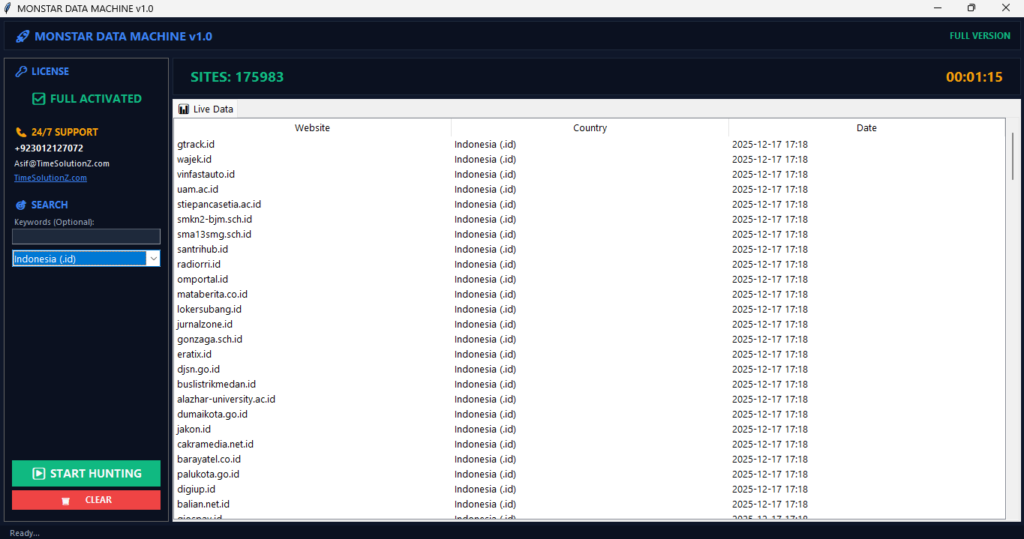
When you Extract B2B Leads from Niche Directories, the last thing you want is a server error stopping your progress. To Avoid IP Blocking While Scraping, you must master the art of blending in. Websites now use advanced bot detection to spot automated scripts, often leading to annoying bans that ruin your workflow.
By using high-quality residential proxies and smart request headers, you can successfully hide your digital footprint from even the toughest security systems. If you want to keep your data harvesting project stable and fast, you need the right technical approach.
Read on to learn how to stay invisible and collect your data without getting blocked.
How to Avoid IP Blocking While Scraping
To keep your scrapers working, you need to act like a real person visiting a site. If you grab data as fast as your computer can, websites will spot you and block your access. You must use reliable residential proxy networks that rotate your IP address frequently.
Make sure to mix up your timing between requests. Send real browser headers too. Modern sites watch for patterns. Do not be too fast. Make your digital fingerprint look just like a normal browser to stay hidden. You have to find the right balance to get past security filters.
Web scraping is a great way to pull big sets of data, like when you need to extract B2B Leads from Niche Directories. But websites watch their traffic to stop data theft and keep their servers fast.
If you send too many requests from one spot, they flag you as a threat. Use the right tools and smart moves. You can get the info you need without getting banned.
Why Websites Block Web Scrapers
Websites use blocks to protect their private data, keep their servers happy, and look out for their business. If a bot sends thousands of requests every second, the site slows down for real customers.
Companies also use these blocks to stop rivals from taking pricing data or valuable contact lists. Security acts like a fence. It keeps assets safe. This blocks unwanted bots to make sure the site stays fast for normal users.
These sites need protection because too much traffic costs money and leaks secrets. When a server finds a bot, it shuts the door to save room.
If you know why these blocks happen, you can plan your project better. You will not look like a mean bot.
How Modern Anti-Bot Systems Actually Detect Scrapers
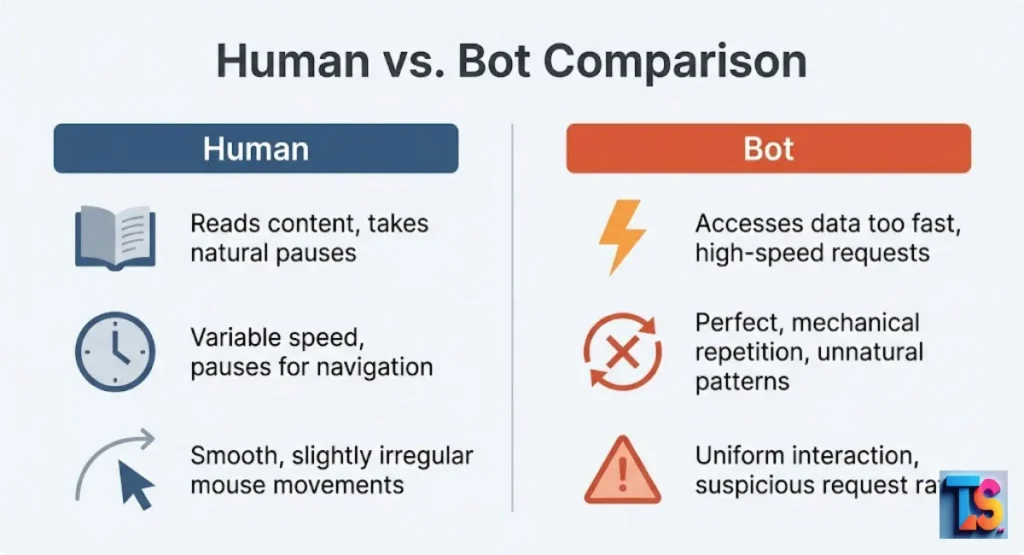
Smart systems use math to find non-human patterns in your traffic. They check your network, your computer parts, and how your mouse moves on the page. If your request looks like code instead of a person, the system flags it fast.
New tools in 2026 even catch tiny differences in how your software handles secure connections.
Security teams now use fancy software to watch incoming traffic. These systems look for red flags that show a connection isn’t from a real browser. Data scraping is everywhere now.
Because of this, websites got better at spotting machines. You need to know these tricks. Adjust your code. Stay hidden.
TLS Fingerprinting
TLS fingerprinting looks at the secret handshake your code uses to start a secure visit. Different tools use different ways to connect, so servers can tell exactly what you are using.
If the handshake does not look like a regular browser, the server bans you right away. No questions asked. Security sees unknown connections as big risks.
This tech lets servers see right through a basic scraper. Even if you use a proxy, the handshake gives you away. To pass, you must use tools that copy the TLS handshake of a real browser like Chrome.
If your handshake is fake, security systems spot you before you even see the page.
Browser Fingerprinting
Browser fingerprinting grabs details about your machine and your setup. This includes your screen size, time zone, fonts, and what system you run. If you say you are a popular browser, but you don’t have the data of a real device, the server knows you are using a tool.
If your headers do not match your fingerprint, you get banned. The site checks your digital ID before it shows you anything.
This builds a profile of your machine. When you scrape, your code must show a profile that matches a real computer. If your request says you are on a phone, but you report a desktop screen size, the server sees the lie.
Modern sites keep a big list of common fingerprints. They use these to catch bots that try to hide.
Behavioral Detection
This method watches how you move and interact with the site. A real person stops to read. They click buttons at different speeds. They visit pages in a normal order. A basic scraper often visits pages in a perfect, fast loop.
If your path lacks the natural pauses of a human, the site flags the automation and blocks you. The target system looks at your engagement timing to find scrapers.
The system keeps a record of your path. It sees if you visit pages without ever scrolling. It notices if you click links too fast for a human. Since 2026, many sites also track mouse moves and hover events.
If your bot does not mimic these natural pauses, the security system labels your code as a fast data harvester.
Essential Strategies to Avoid IP Blocking
To stay in, you must use smart ways to hide your bot identity. IP rotation, proper headers, and human-like delays are the base of stealthy harvesting. Utilizing Advanced Data Harvesting & Scraping techniques allows you to plan your requests and stop security from finding your code.
These moves keep your project going. It stays stable and safe from sudden blocks.
When you do hard data work, you must act like a normal user. If you extract B2B Leads from Niche Directories, your goal is to blend in. By mixing rotation and correct headers, you mask your bot.
These tricks build a solid plan. You can pull lots of data without drawing eyes from the server security’s attention.
1. IP Rotation: The Foundation of Stealth Scraping
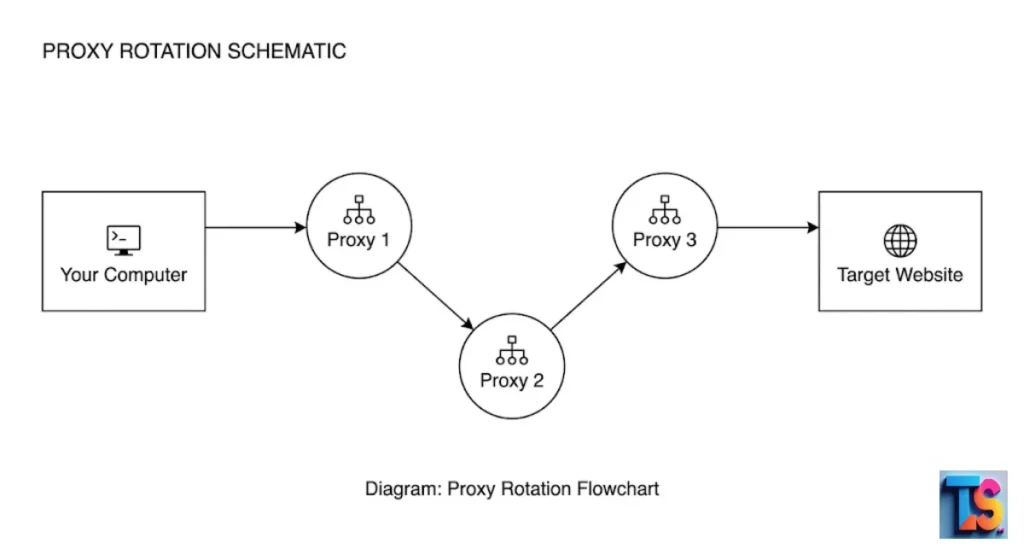
IP rotation means switching your IP address a lot so the server cannot track your starting point. By sending requests through a big pool of different IPs, you look like many users instead of one machine.
This stops one IP from hitting the limit set by a site. It keeps your work moving smoothly and safely. Your target software must switch doors all the time to beat site patterns.
A good rotation plan is the best way to stay hidden during big jobs. When you pull leads, you must cycle through fresh IPs.
If you stay on one for too long, the server sees the heavy volume. Rotating your IP for every request or every few pages keeps your trail small. This stops your scrapers from getting stuck.
2. Set a Realistic User-Agent Header
A User-Agent is a text bit that tells the site your browser and system. If you leave this blank or use an old default, the site blocks you fast. You must always set your User-Agent to match a new version of a common browser.
This header acts like your ID when you visit sites. The system needs to see a real browser name to let you in.
Always keep your User-Agent fresh. Match it to current versions of Chrome, Edge, or Safari. If you use a crusty old header, the server sees you as a threat.
Many pros pull a list of modern User-Agents and pick a random one for every session. It makes your traffic look different and real to the server.
3. Set Other HTTP Request Headers (Mimic a Real Browser)
Websites check for headers like Accept-Language, Referer, and Connection to see if you are a person. Real browsers send these headers on their own. If your code sends nothing, it looks fake.
Setting the full set of headers makes your scraper look like a normal visit. This helps you get past basic filters while you work.
You should mirror the headers sent by your own browser when you visit the site. For example, make sure your language settings match your target audience. These small bits add context to your request.
By sending a complete set of headers, you lower the chance the server will reject your code for looking like a simple bot.
4. Randomize Delays Between Requests (Be Polite)
If your code asks for a new page every few milliseconds, the server will block you fast. Add random wait times between requests to copy human reading speed. For example, wait between three and fifteen seconds.
This politeness takes the heat off the server. It keeps your activity inside normal traffic lanes. This helps you get data without any breaks.
People do not click links at a steady, machine speed. They look at pages. They read text. They pause before moving. By putting in a random delay, you break the repetitive pattern that security systems look for.
This is vital when getting big lists. It keeps your traffic flow looking organic, respectful, and safe from automatic bans.
5. Set a Referrer (Use with Caution)
A Referrer header tells the site which page you were on before. Setting this to the home page or a search result makes your visit look real. Do not do it too much.
Make sure the referrers you use match the pages you are scraping. If they don’t, the server will see your path makes no sense. Your data trail must tell a logical story to stay safe.
Using a Referrer can help your request seem like a natural click. But using a random URL is a rookie mistake. Always set the Referrer to a page that actually links to your target.
This simple trick adds more trust to your request. It helps you blend in with normal folks.
6. Use a Headless Browser (For Complex Websites)
A headless browser is a real browser that runs without a screen. It runs JavaScript and uses cookies just like a normal browser. This is a must for modern sites that load info on the fly.
Because it acts like a real browser, it is much harder for security to spot than a simple script. It is a strong choice for hard data harvesting.
Many websites need JavaScript to show their content. Standard HTTP scrapers cannot see this. A headless browser can. It parses the page. It clicks buttons.
It loads all the parts before you save the info. Since it mimics a full browser, it helps you pass hard security tests that would stop a simple text script.
7. Avoid Hidden Traps (Honeypots)
Honeypots are invisible links in the code that only a bot would click. If your scraper hits a link hidden from human eyes, the site knows you are a bot. You must check the page code before you scrape.
Make sure your code only clicks links that are clearly there for humans to use. Your script needs strict rules to avoid these fake links.
Websites use these to catch scrapers. If you are not careful, your bot will trigger a flag by clicking a link no person would ever see. Always write your code to ignore any hidden parts.
By avoiding these traps, you stay under the radar. You keep your scraper running without issues.
Tips For IP Rotation for Web Scraping Without Getting Blocked or Blacklisted
To stay safe, rotate your IPs well without raising alarms. Using diverse addresses and avoiding bad habits keeps the system from locking you out.
These tips help you manage your connections like a pro. They make sure you can keep getting leads while staying quiet across every target you visit.
Keeping your IP healthy is a big part of pro harvesting. If you just swap IPs without care, you might still get caught. By following these rules, you manage your session and your history right.
These tricks let you keep your scrape going steadily. This is key for long jobs like Clean Raw Scraped CSVs for Outreach.
Do Not Rotate IP Address After You Have Logged In or Started to Work in Sessions
If you log in, stick to the same IP for that whole session. If your IP address changes while you are logged in, the site thinks your account is at risk.
This usually causes a security check or a total ban. Keep your IP steady until you finish and log out. Your connection settings must stay stable while you are logged in.
Consistency is key when you are scraping behind a login. If your IP jumps from one country to another while you are in, the site security will see it as a threat.
Always set your scraper to use sticky sessions if you need to stay in one place. This keeps your activity stable and stops the server from flagging your account for weird behavior.
Avoid the Use of Proxy IP Addresses in a Sequence
Do not use proxies that are next to each other. If you use a list of IPs that look the same except for the last digit, the server will spot the pattern fast.
Use a pro service that picks from a big, random pool of addresses across different blocks. This makes your traffic look like it comes from many real users. Firewalls catch sequential changes from bots instantly.
Servers can spot patterns in proxy ranges. If you use 100 IPs in a row, the security system sees they all belong to the same source.
A good proxy service avoids this. It gives you diverse IPs that do not look related. This helps you avoid big blocks that target your whole network.
Use Free Proxies Only for Testing
Free proxies are slow. They are flaky. They are often blacklisted because thousands of people use them at once. They are fine for learning how to code your scraper.
But they will fail in any real project. Never use free IPs for real work. They will get you blocked almost immediately by almost every site. Public routes do not protect your scripts from strong site firewalls.
You get what you pay for. Free options are easily tracked and often already banned. If you try to pull B2B leads from directories using free IPs, you will hit CAPTCHAs or errors fast.
Save yourself the headache. Use reliable, paid proxies that keep your work clean.
Choose the Right Proxy Type for the Target
Use residential proxies for most sites. They look like real home internet. Use datacenter proxies only if you are scraping massive sites that allow that kind of traffic.
Matching your proxy type to the site is the best way to stay hidden. Pick your network based on how hard the site is to scrape.
| Proxy Type | Best For | Advantages |
| Residential | Tough Sites | High trust, looks like a home user |
| Datacenter | Large Speed | Very fast, lower cost, good for huge tasks |
Residential proxies are harder to block because they come from real internet providers. Datacenter proxies are faster but easier to spot. Always test both to see what works for your directory.
Using the right tool for the job raises your success rate. It helps you collect all the data you need without errors.
Get Premium Proxies for scraping at a large scale
Premium proxy providers offer clean, high-quality IP pools. They rotate these IPs for you and manage the network health. Buying from a pro is the best way to prevent blocks during big projects.
A premium service takes the technical weight off your shoulders. You can focus on getting the data you need. Good resources keep your scripts running without stopping.
A pro provider keeps their pool healthy by removing bad addresses and adding fresh ones. This is vital when you are pulling massive amounts of data.
With a premium service, you get better uptime, faster speeds, and a much lower block rate. It is the best money you can spend to keep your scraping productive and live 24/7.
What to Do If Your IP Gets Banned While Scraping
When you hit a ban, find the cause and swap your connection fast. Knowing how to handle blocks helps you keep your scraper moving. You won’t waste time on dead links.
By following a plan, you can fix the issue. You make sure your data work continues without losing progress.
Handling a ban is part of the job. Even the best scrapers hit walls if a site updates its security. Have a backup plan ready. You ensure your script stays live.
Whether you swap to a new proxy or call for help, be fast. Protect your data speed and your project health.
What Is an IP Ban?
An IP ban happens when a site refuses to take data packets from your address. When this happens, you usually see error codes or you get sent to a never-ending CAPTCHA page.
The server has decided your IP is a risk. It won’t let you see the content anymore. These blocks freeze your connection to keep the site safe.
Knowing the difference between errors helps you fix things faster. A 403 error means the server is saying no. A 429 error means you have sent too many requests.
Both act as a wall. Once you see these, you know your current IP is in trouble. You need to act.
| Error Code | Meaning | What It Usually Means |
| 403 | Forbidden | Access Denied: Your IP or user agent is blocked |
| 429 | Too Many Requests | Rate Limit Hit: You are scraping too fast |
What to Do If Your IP Is Under Ban
If you are blocked, swap your source to keep working. First, check if the ban is short or long. If you use a proxy service, switch to a new IP right away. If you are not using a proxy, wait for the ban to end or change your network settings.
Don’t let a ban stop you. Most bans are done by robots based on your recent work. If you can swap your IP, you can often start again right away. Keep a log of which IPs get banned.
You can avoid those subnets later. Being proactive saves time. It keeps your project on track.
Tip 1. Contact Support to Request Unblocking
If you are scraping a partner site or a directory where you have a real business link, email their support team. Explain that your automated process accidentally tripped their security.
Ask them to whitelist your IP range. This works best when you have a real reason for the data and you are not breaking their rules.
A nice email often clears up accidental blocks. Many companies allow data harvesting if you do it nicely. If you explain that you are a client, they might help you.
Always share your IP address so they can update their firewall. This builds a good bond. It ensures you have kept access to the data.
Tip 2. Restart Your Router
Many home connections use dynamic IPs. Turning your router off for a few minutes and back on can sometimes give you a new public IP.
This is a quick fix. But it won’t work if your provider gives you a static IP or if the site bans your whole ISP range. It is a good first step for simple blocks.
This trick forces your modem to ask for a new IP from your provider. It works well if you scrape from home and get a small block. But it is not fast enough for scaling.
You cannot restart your router hundreds of times a day. Use this only for minor issues at your desk.
Tip 3. Try Connecting via VPN
A VPN changes your public IP by routing your traffic through a different server. This can get past a simple ban. But it is not a long-term fix for pro scraping. Big websites have lists of known VPN IPs.
They will block them just as fast as your home IP. It is a handy, quick fix for some spots.
While a VPN hides your location, it doesn’t hide the fact that you are using a VPN. If you want high-quality harvesting, a VPN is not enough to pass tough security.
It is best used for getting past regional locks. For real, ongoing work, use high-quality residential proxies instead.
Tip 4. Use Proxies
If you are banned, the easiest way to keep working is to swap to a fresh proxy. High-quality services let you toss a banned IP and grab a new one right away.
This makes sure your project does not stop. You keep your flow steady. You get past bans without stopping your script or touching your hardware.
Proxies are the gold standard. They give you a huge pool of IPs that you can use whenever. If one IP gets flagged, your script drops it. It picks another one from your list.
This is seamless. It keeps your data moving. It is the most reliable way to stay active even when sites try to block you.
Web Scraping IP Rotation Service: When to Use a Managed Solution
Use a managed service when the site has high security like CAPTCHAs, or when the site changes all the time. A managed service handles the rotation, fingerprinting, and sessions for you.
This lets you focus on the data you need. No more fighting constant blocks. It is a smart choice for big tasks where time is money.
Managed solutions are “set it and forget it.” They do the heavy lifting of beating anti-bot tech. Your code stays simple. If you are struggling to get leads from a site that breaks your scraper, a managed service is the best way to get results.
It saves you the time of building your own bypass tools from the ground up.
FAQs
What is the best way to avoid getting blocked?
Combine several proven tricks to hide your scraper. Use high-quality rotating residential proxies. Mimic real browser headers. Scrape at a slow, human speed. By keeping your work balanced and nice, you stop security from finding a reason to flag you. Use many different paths to stay hidden. Consistent work is the key to long-term success. If you push too hard, you will hit a wall. By spreading requests over time and using diverse IPs, you stay invisible. This keeps your project safe.
Is web scraping legal?
Public data is generally fine to scrape. Always check the site terms and follow ethics, like not hitting the server too hard. As long as you respect privacy and don’t copy private data, you are usually safe. Always scrape politely. Don’t damage the site speed. Check the robots.txt file to see if they allow bots. This helps you keep a good bond with the site owner.
What is a headless browser?
It is a browser without a screen that can run JavaScript. It looks exactly like a real user. This is key for modern sites that load info after the page opens. By using a headless browser, you can see all the data a human would see. This is a must for capturing all the info you need.
What is a proxy server?
A proxy server is a middleman between your computer and the site. It lets you use a different IP for your requests. This keeps your real IP hidden and helps you avoid getting blocked. It is a must-have tool for any data pro who wants to stay private and scale their work.
What is a User-Agent?
A User-Agent is a header that tells the site your browser and system. It tells the site how to show content for your device. If you don’t use a real User-Agent, the site knows you are a bot. Using a real, fresh User-Agent is one of the most important steps to staying hidden.
How often should I rotate my IP address?
Ideally, rotate your IP for every request or every few requests to keep your trail tiny. This makes your traffic look like it comes from many different people. Rotating often is the best way to stay under the radar. The more you rotate, the harder it is to track you.
What happens if my IP address gets blocked?
You will see error codes like 403 or 429. The site stops talking to you. This means your current IP is flagged. You need to swap to a new one or wait for the ban to end. Being blocked is normal. Always have a backup plan to swap IPs. Don’t panic. Just swap and keep going.
The Bottom Line
That scraping without getting blocked depends on how well you copy a human visitor. Use rotating residential proxies. Manage your headers. Stay polite with your request speed.
You can get past most modern security systems. Focus on quality over speed to make sure your work stays steady, reliable, and strong throughout 2026. This smart plan keeps your B2B lead generation running smoothly. It keeps you ahead of the game.
Data collection is a big tool for your business, but be careful. Follow these rules. Stay safe and keep your access open. Watch your logs. Fix your strategy if you see more errors.
Being proactive and professional will make sure your scraping stays productive. It will be a big win for the whole year ahead. And remember to Clean Raw Scraped CSVs for outreach, so your final list is ready to go.