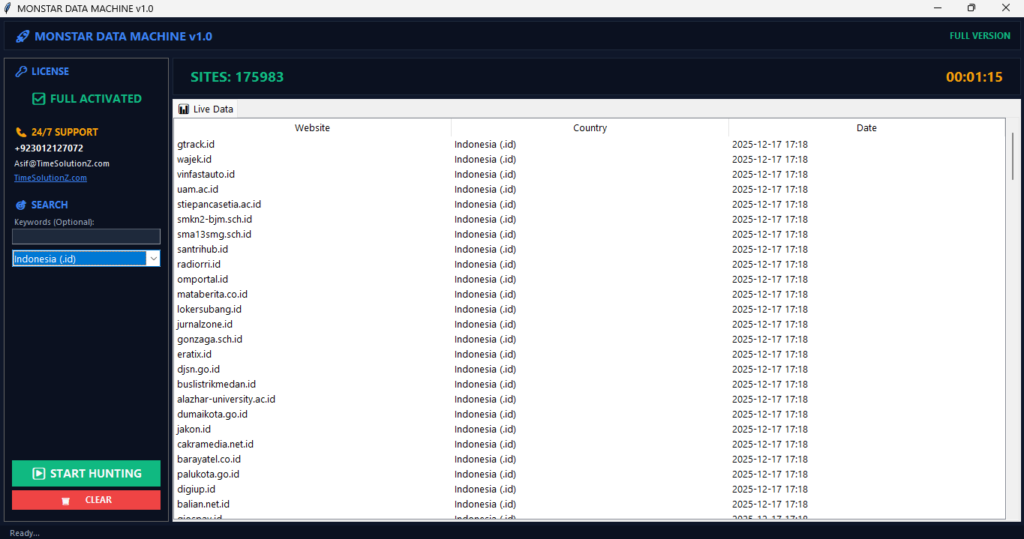
Finding the right customers is tough, but using B2B Leads from Niche Directories makes it simple and fast. Instead of wasting time on huge, messy lists, you can zoom in on specific industries where your best buyers hang out.
When you gather data from these tiny, focused hubs, you get clean information that leads to more sales. It turns boring web pages into a goldmine of new growth for your brand.
Using this smart method, you skip the competition and talk directly to people who need your help right now. Start using this tactic today to fill your sales pipeline with high-intent prospects who are ready to buy from you.
Why Niche Directories Matter for B2B Lead Generation
Niche directories are like goldmines because they gather companies in one specific trade or area. Instead of digging through giant databases full of old, bad profiles, these sites offer a direct look at a filtered audience.
Pulling data from these special hubs makes sure every contact fits your business goals. It makes your sales numbers jump up.
Modern marketing needs real aim. You do not want to waste cash on cold pitches. Niche platforms remove the guessing game. They sort prospects by category. This makes your work land much better.
High Intent vs Generic Data

Niche directories offer high-intent leads because listed businesses actually want to be found by partners and buyers. Generic databases give you a huge list, but most companies there do not fit what you need.
This gap causes low interest and high bounce rates. Choosing specialized hubs means you get clean info from active companies.
The differences between these data sources change how well you do:
| Data Context | Broad and unorganized | Industry-specific and clear |
| Lead Intent | Low or unknown | High and self-selected |
| Data Hygiene | Often outdated | High accuracy from experts |
| Cost Value | Low return on investment | Highly efficient spending |
Better Targeting and Market Relevance
Getting data from a target spot gives you a clear look at industry pains. This lets you write sharp, personal notes that talk about specific problems.
When you use industry words and mention recent market trends, prospects trust your skill. Personal notes build much stronger bonds than mass emails ever can.
To get the most out of your market hunt, focus on these bits:
- Target specific sub-categories in the main directory.
- Note down the local talk used by the listed profiles.
- Match your product features with the exact business notes you find.
Lower Competition in Specialized Sectors
Most sales teams only use the big, famous lead databases. This means smaller, niche directories stay ignored and full of fresh leads.
The businesses on these sites get fewer generic sales pitches every day. Reaching out makes you look like a helpful partner in a quiet inbox.
When buyers are not buried by spam, they read your mail. This low noise gives your team a clear path to the boss. It turns small directories into big wins.
How to Identify the Right Niche Directories
Finding the right directory is the most important step for your project. You must pick sites that keep their lists fresh. Check a site carefully before you copy its data.
This stops future errors. It keeps your pipeline clean and full of real contacts.
A good check process prevents tech bugs later. Spending time on research early means your tools gather good, profitable records.
Analyzing Directory Authority
Big-name platforms give you solid data because they care about their online rank. These sites rank very well on search engines for industry terms. Real pros use them.
You can check their weight by looking for mentions in trade journals to confirm their directory authority.Trusted directories remove dead businesses fast. This saves you cleaning time.
Look for these signs to see if a site has real authority:
- High visibility in search results for specific keywords.
- Links with official trade groups or local chambers.
- Strict rules that stop fake accounts from joining.
Checking Data Freshness and Quality
Old info is a massive wall for your sales team. Before you start, check the dates on new member profiles.
If a site has broken links or shows old company logos, the data is likely stale.
You can run a quick quality check with these steps:
- Check the dates on recent member posts or company updates.
- Look for an active blog or community forum on the site.
- Avoid sites with broken links and bad designs.
- Test five to ten phone numbers to see if they work.
Assessing Potential Lead Volume
You need a site that offers a healthy balance of specific data and large numbers. Look through the main categories to see the average number of listings per page.
The directory must have enough unique entries to support your sales for a few months. This volume makes your time setup worth it.
To count the total volume, use this simple workflow:
- Count the total number of sub-categories relevant to your offer.
- Multiply the average listings per page by the total number of pages.
- Make sure the total meets your goal for the quarter.
Technical Methods to Extract B2B Leads

Picking the right tool depends on your budget and tech skills. Some tools need zero code and run inside your web browser.
Bigger projects need strong systems that run in the cloud. Picking the right setup lets you gather data fast without breaking any web rules.
Using Advanced Data Harvesting & Scraping makes sure your data stays clean and right throughout the job.
Manual Data Harvesting Limitations
Manual work means you copy and paste company details line by line. It is free. It needs no software. But it is very slow.
It also leads to human typos and messy formatting. You should only use manual entry if you have a tiny list.
The hidden costs make manual entry bad for growing companies:
- High human error rates lead to broken email formats.
- Slow work stops your sales team from growing.
- Boring tasks lower employee mood.
Using Browser Extensions for Quick Extraction
Browser extensions let you pull data with one click. These tools are perfect for beginners. They use simple screens where you point and click on text fields.
The extension turns the site text into a clean file. It is a fast way to test a new directory.
Most modern extensions let you map data visually:
- Open the directory page and hit the extension icon.
- Click on a business name to train the tool.
- Export the selected text blocks directly into a file.
Leveraging Automated Scraping Infrastructure
Automated scraping systems are a must when you need thousands of business leads. These programs visit hundreds of directory pages in minutes without you.
You can schedule these tools to run every week, keeping a flow of new names. This automated process gives your sales team a big edge.
Cloud setups offer key wins for big teams:
- Non-stop collection that runs away from your local machine.
- Auto-schedules to catch new listings the moment they go live.
- Direct API links that send fresh leads to your main database.
Handling Anti-Bot Systems and Restrictions
Many websites use security to block robots. To win, you must make your scraper act like a human. You can do this by slowing down requests.
Use proxy tools. This keeps your system running without triggering firewalls.
Use these settings to avoid detection:
- Add random time delays between your page requests to look human.
- Use rotating proxy networks to hide your main computer identity.
- Watch your success rates to catch security blocks early.
- Respect the speed limits set by the directory host.
Essential Data Cleaning and Qualification
Raw data from the web is almost always messy. It needs a good scrub. Skipping this means your database fills with copies and broken emails.
Good hygiene makes sure your sales team talks to real people. It also protects your email account from getting blocked.
Learning how to Clean Raw Scraped CSVs for Outreach protects your brand and makes your work count.
Removing Duplicates and Incomplete Records
Scrub your sheet to remove identical lines and empty rows before you upload it. Kill any business that lacks an email address or a phone number.
A clean list keeps your sales efforts on track.
Use your sheet app to do these cleaning steps:
- Run a duplicate check to remove repeating rows.
- Filter out rows that miss vital info like web domains.
- Standardize business addresses so they look clean.
- Delete companies that are marked as closed.
Verifying Email Addresses and Phone Numbers
Always run your raw list through a bulk check service before you send mail. This software checks if the inbox is real without sending a message.
Pulling out dead accounts makes your delivery rates jump. It keeps your business domain safe from spam filters.
High bounce rates kill your sender score. Check tools protect you by flagging bad addresses before you hit send.
Enriching Data with Firmographics
Firmographics are details like revenue, staff count, and office spots. Adding this helps you rank your leads. You find the best accounts.
This extra data filters out firms that are too small or not a fit.
You can optimize your list with these actions:
- Sort by staff count to find matching buyers.
- Identify the exact job titles you need to target.
- Group your leads by region for local talk.
- Compare collected details against your ideal customer.
Integrating Leads into Your Sales Pipeline
Moving your clean data into your daily flow turns a sheet into money. Importing your leads into a main database lets you track every email and call.
This clear setup ensures no prospect gets forgotten. It helps your team move deals forward.
A smooth move cuts down manual work and stops team confusion.
Mapping Data to CRM Fields
Match your sheet columns with the fields in your sales software before you import. Make sure names, sites, and emails align with your setup.
This careful step stops data loss. It also lets your team filter records to build custom lists later.
A good match template should include these exact alignments:
- Source “Company Name” maps to CRM “Organization Name”.
- Source “Direct Email” maps to CRM “Primary Contact Email”.
- Source “Industry Category” maps to CRM “Custom Tags”.
Automating Outreach and Follow-ups
Once your contacts are in your system, use automation to send notes. These tools track who opens your mail and clicks your links.
Automating the early follow-up saves hours of work. It lets your human reps focus on talking to hot buyers.
Smart sequences change based on what the buyer does:
- Trigger a warm follow-up if a link is clicked.
- Move cold prospects to a monthly news track.
- Tell an agent immediately when a lead replies.
Compliance and Ethical Data Practices
Gathering data with honor is key to keeping your brand safe. Always respect site rules and follow privacy laws.
Being a good pro builds trust with new customers. It makes sure your methods work for years to come.
Ethical work stops legal jams and keeps your name clean.
Respecting Robots.txt and Site Terms
Every site has a file called robots.txt. It says what you can and cannot touch. Read this file before you start any job.
Always set your tools to follow these basic rules:
- Check the root domain for robot permissions.
- Pick directories that allow public use in their terms.
- Keep your tool speed low so you do not hurt the site.
- Keep logs of your steps for safety.
Adhering to Data Privacy Regulations
World laws say how you store contact info. You must give a clear way for people to opt out.
Storing your data in an encrypted spot stops leaks. Following these laws protects your firm from heavy fines.
Compliance needs clear talk with every contact on your list. Make sure your business address and an opt-out link are in every outbound note.
Maintaining Professional Outreach Standards
Your goal is to give value, not to clog their inbox with spam. Keep your notes honest, short, and very relevant. Say clearly why you are writing and how you can help. This polite way builds long-term trust and drives more replies in your professional outreach.
Treat every cold contact with respect. Research them before you hit send. Quality beats bulk spam.
Common Challenges and How to Solve Them
Web work hits tech walls because sites change all the time. Spotting these problems early lets you fix them before your lead supply dies.
Stay flexible. Update your tool settings to keep your data fresh.
Looking ahead for changes lets your team keep a steady flow of sales data.
Managing Inconsistent Directory Structures
Sites update their look. This can break your collection settings. If you see your sheet is missing data, check if the site layout changed.
You can handle shifting designs with these habits:
- Verify your data points often to check for accuracy.
- Build modular tool profiles that you can fix easily.
- Use visual testing to match site code with your tools.
- Save backup templates to switch settings fast.
Overcoming IP Blocking
If a site blocks your access, it means your tool is going too fast. The best fix is to use Avoid IP Blocking While Scraping.
This system changes your digital home for every page view. It makes your work look like a normal web user.
Knowing how to dodge IP bans is key for keeping your speed up. Using proxy networks lets your scraper reach pages without hitting server bans.
Keeping Databases Updated
Company info dies fast as firms move or close. An old list causes high bounce rates. It wastes your time. Make it a rule to refresh your whole list every three to six months. Freshness keeps your team hitting real, live targets.
Set a schedule to re-check existing records before you start new sales. Cleaning out dead data keeps your marketing high-speed.
FAQs
Is it legal to extract B2B data from directories?
Collecting public business details is generally okay for sales. You must follow local privacy laws and respect the rules on the source site. Always offer a quick opt-out link. Use the data in an honest way.
What is the difference between niche and generic lead lists?
Generic lists give huge piles of data but lack industry focus. This leads to low results. Extract B2B Leads from Niche Directories provides only firms in your exact market. This lets you personalize your talk, which saves time and starts better business chats.
How can I ensure my scraped data is accurate?
Accuracy starts by picking trusted sites that update their lists. After you grab the data, use automated tools to see if the emails and phones still work. Doing quick manual checks on your best prospects also ensures your list is clean. You should Clean Raw Scraped CSVs for Outreach to get the best results.
Do I need coding skills to extract data?
You do not need to be a coder. Modern browser tools let you harvest data by clicking the fields you want to save. These visual tools are built for sales pros who need fast, reliable info.
How often should I update my lead database?
You should refresh your data every three to six months. Contacts and phone numbers change all the time. Old lists lead to high bounce rates and lost time. A regular update routine keeps your pipeline clean.
The Bottom Line
Extracting B2B leads from niche directories is one of the smartest ways to build a sales pipeline in 2026. By focusing on tiny, expert platforms instead of generic dumps, you get high-intent buyers. This saves time. It kills marketing waste.
Success takes a heart for clean habits, honest scraping, and regular updates. When you use the right tech tools and add personal notes, your outreach turns public data into real, predictable growth.