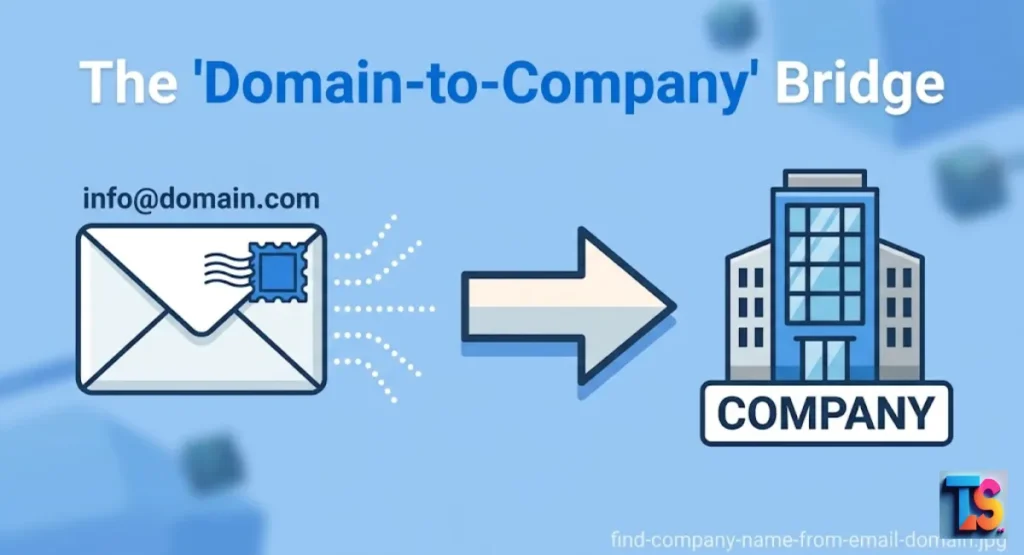
Finding the right business identity when you only have an email address is a common obstacle in modern B2B lead research techniques. To find the company name from email domain entries effectively, you must map them to their official entities.
This allows you to gather essential firmographic data, enabling you to personalize your sales approach for maximum impact. By correctly matching these domains, you can improve your overall lead enrichment process and ensure your messages reach the right decision-makers at the appropriate organizations.
Whether you are cleaning your database or preparing for cold outreach, mastering these techniques helps you build a more accurate prospect list and verify every business entity quickly to improve conversion rates in 2026.
4 Proven Methods to Match Domains to Company Names
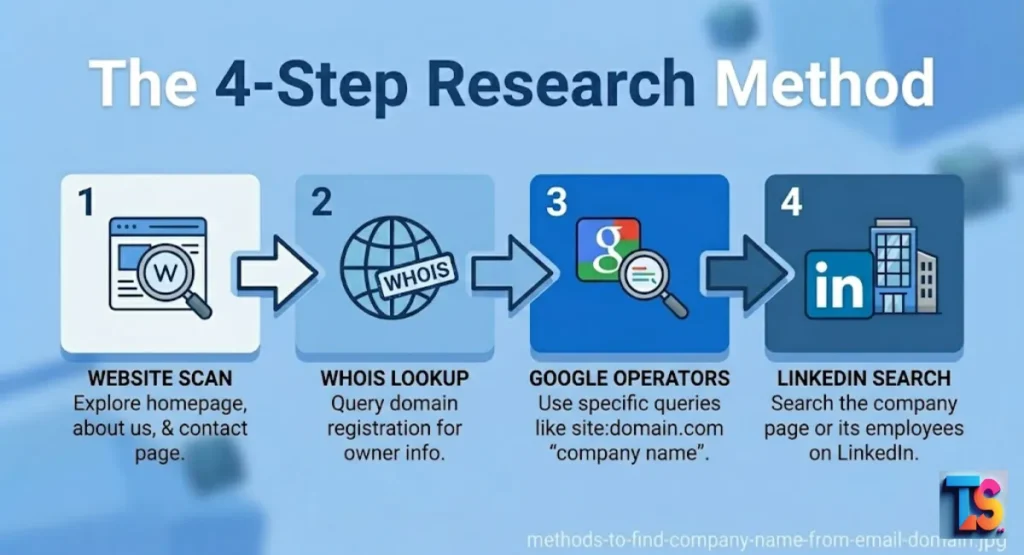
You can identify a company by checking its official website, using public record databases, or searching on social media platforms. These four proven methods help you connect a domain to a real business entity.
Each step builds a clear digital footprint. This allows you to verify the company behind every email you need to contact.
Method 1: The Direct URL and Home Page Scan
The fastest way to identify a company is to visit its website directly. By typing the domain into your browser, you can scan the header and footer for the legal name.
Most businesses clearly list their formal business entity here. This simple manual check remains the most reliable starting point for any research task.
Visit the root domain to see their brand identity. Most sites show the company name in the footer, as this is standard for legal compliance. Look for “About Us” or “Contact” pages if the home page lacks detail.
This process helps you build a strong digital footprint for your leads while ensuring you have the right company name.
Method 2: WHOIS Domain Registrant Database Lookup
Privacy laws like the GDPR a WHOIS lookup tool provides access to the public registry that stores ownership data for Google search operators every domain. By searching the domain, you can often find the name of the organization that registered it.
This is a very powerful way to trace the legal owner behind a website when the brand name is not obvious.
Use ICANN WHOIS or similar tools to perform a reverse WHOIS search. Look at the “Registrant Organization” field to find the legal company name. If a privacy service hides the owner, check the “Administrative Contact” details.
This data provides firmographic data that is essential for your lead enrichment efforts and helps you verify the business.
Method 3: Google Advanced Search Operators for Hidden Brands
Google search operators help you find specific pages on a website that reveal the company name. You can use commands like site:domain.com “company” to filter out all extra noise.
These smart commands force Google to show pages that mention the business name, making it very easy to confirm the official identity of the brand.
Use ” site:domain.com ‘about” to find the company’s mission page quickly. You can also search the domain name in quotes to find indexed pages. This shows you the digital footprint of the business clearly.
These search methods save time and improve your lead enrichment accuracy by helping you find the right company name every time.
Method 4: LinkedIn Corporate Directory Scraping
LinkedIn is a massive database for professional corporate information and business entities. By pasting the domain into the search bar, you can find the official company page.
This page often contains the official business name, industry, and location. It is a highly effective way to confirm firmographic data for your sales outreach lists.
Once you find the company page, look at the About section to get all the details. This is excellent for lead enrichment because it links the domain to real employees and office locations. You can also find CEO LinkedIn profile from company domain pages to identify key decision-makers and understand the business entity.
| Method | Speed | Accuracy | Best For |
| Website Scan | Fast | High | Clear, active sites |
| WHOIS Lookup | Medium | Medium | Hidden or private sites |
| Google Search | Medium | High | Finding hidden brands |
| LinkedIn Search | Slow | High | Confirming firmographic data |
Scaled Solutions for B2B Teams
Scaling your lead research requires smart systems that work fast and save you time. You can use simple spreadsheet formulas or automated software to process bulk data.
These solutions provide clean, accurate results for large lists. They allow your team to perform lead enrichment at scale while keeping your contact data organized and very professional.
Free Google Sheets Formula to Extract Domain Names
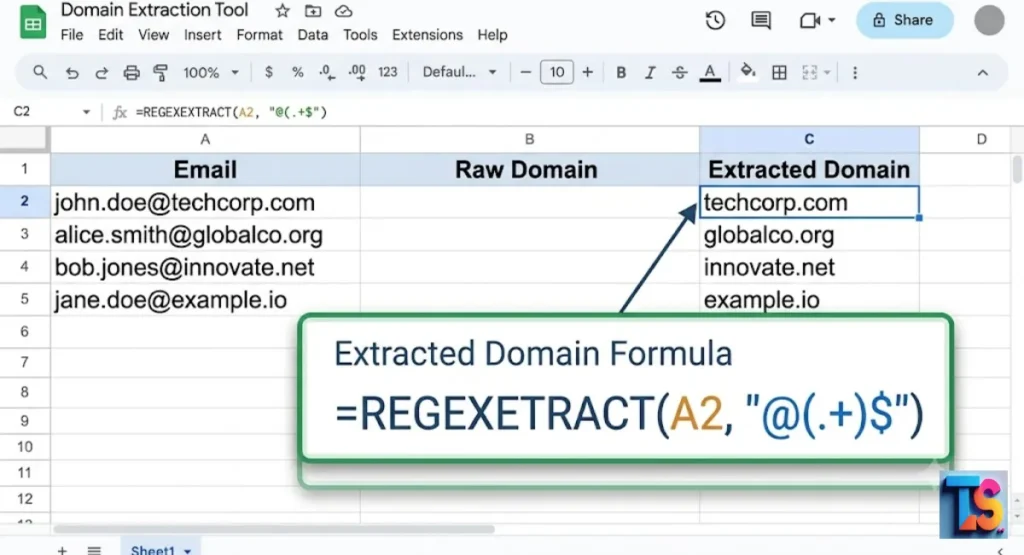
Google Sheets offers a simple way to clean your email lists for research. You can use the REGEXEXTRACT formula to strip the username from an email address in seconds.
This leaves only the domain. It is a free, fast, and very effective tool for anyone who needs to handle large lists of lead domains.
Open your sheet and put emails in column A. Use the formula =REGEXEXTRACT(A2, “@(.+)”) in column B. This pulls the domain out of the email. Now you have a clean list.
This makes it easy to research the company name, check the domain authority, and organize your firmographic data for your sales team.
Automated Data Enrichment Tools for Bulk Processing
Automated tools use advanced algorithms to map domains to company records instantly. Services like Apollo, Hunter, or Clearbit allow you to upload thousands of domains at once. They return the company name, industry, and size for every lead. This is the best way to handle large volumes of data for professional lead enrichment tasks.
Upload your file of domains to these platforms. The software matches each domain to a verified business entity in its database. This process gives you deep insights, such as firmographic data, which helps with lead scoring. It removes the need for manual work, keeping your data accurate and saving your team many hours of effort.
Troubleshooting Tricky and Anonymous Domains
When a domain is hidden, you can look at technical records or legal pages to find the owner. Use reverse WHOIS checks or search for the company name in privacy policies.
These steps solve issues with private or generic domains. This helps you maintain a high domain reputation and keeps your contact lists very clean.
What to Do if the Domain Uses Privacy Proxy Guards
A privacy proxy hides the owner, but the legal pages usually show the real company name. Check the Privacy Policy or Terms of Service on the website.
These documents must disclose the legal entity by law. If the site is empty, look for technical server records to find the brand identity of the business.
Privacy guards are common, but they do not hide legal information. Always check the footer for links to legal pages. These pages often list the official business entity name and address.
This helps you get firmographic data even when the WHOIS data is hidden. It is a smart way to reveal a domain’s true owner.
Handling Generic Domains like Gmail, Outlook, or Yahoo
Generic emails do not belong to a specific company domain. To find the company, look at the sender’s name in the email signature. Search for that person on LinkedIn to find their current employer.
Do not try to match the domain. Instead, focus on matching the individual professional to their official company page.
Generic domains are not useful for domain-based research. They lack a unique digital footprint for a business. By finding the sender on LinkedIn, you can see their company, role, and industry.
This gives you the firmographic data you need. This strategy ensures your outreach is targeted to the right person at the right firm.
Decoding Subdomains and Multi-Level Country TLDs
Subdomains and country codes often confuse simple search tools. Always strip these away to find the root domain. For example, change shop.company.de to company.com.
This exposes the main website and the official business identity. Most companies use the root domain for their primary brand, so this is the best place to start searching.
Always clean the URL before you start your search. Remove extra parts like “marketing” or “.co.uk” to get the root. This is the main site where you will find the most accurate firmographic data.
If you still have trouble, check the main site for brand variations. This helps you find the correct business entity.
| Issue | Solution |
| Privacy Proxy Used | Check legal pages on the website |
| Generic Email | Use LinkedIn to find the sender’s employer |
| Subdomain Error | Strip the URL down to the root domain |
| No Website Found | Use reverse WHOIS for registration info |
Why Businesses Enrich Domain Data
Enrichment turns a simple email domain into a complete company profile with industry and size data. This helps you understand who you are talking to.
It improves your sales process by focusing your effort on the right people. It is a vital part of building a strong, successful B2B lead research techniques strategy today.
Enrichment is essential when you have incomplete information. For instance, if you need to find company website domain from name entries, enrichment tools can reverse-lookup the brand to locate their official site.
This helps you build a robust digital footprint for every prospect, allowing you to personalize outreach and improve your domain authority in the market.
Enhancing Lead Scoring and Inbound Sales Funnels
Knowing the company name allows you to score your leads based on their true potential. You can filter out small businesses and focus on high-value targets.
This uses firmographic data to customize your sales pitch. It makes your outreach more personal and improves your conversion rates, ensuring your team spends time on the best leads.
When your system knows the company, it can pull in industry data and news. This helps you personalize your messages. High-quality lead enrichment ensures your team talks to the right people.
This builds trust and authority. You will see better results in your sales funnel when you focus on businesses that fit your ideal profile.
Fraud Prevention and Cold Outreach Compliance
Verifying the company behind an email helps you keep your outreach list safe and clean. You can filter out fake sign-ups and bot accounts before they enter your sales funnel.
This protects your domain authority and improves your email deliverability. It is a key step to maintain compliance with anti-spam laws like the GDPR.
Identifying the business entity reduces your risk. It stops bots from wasting your team’s time. By checking that the email matches a real company, you keep your domain reputation strong.
This helps your emails reach the inbox instead of the spam folder. Proper verification is essential for safe, professional, and compliant cold email outreach programs.
FAQs
Can you reverse-lookup an email domain completely for free?
Yes, you can perform these lookups using free manual methods like Google searches and WHOIS tools. While automated services may charge for bulk work, manual research is perfect for finding the identity of a business for free. These methods are highly effective for building high-quality, small lead lists without spending any money.
Is it legal to look up company information from an email?
It is legal to find information about a company if that information is already public record. You must use this data for professional business communication only and follow all privacy laws, like the GDPR. Always use public data ethically to connect with professionals rather than harassing individuals or sending unwanted spam messages.
Why does the domain name not match the official company name?
Large firms often use trade names or product brands that differ from their legal business entity. It is also common for holding companies to own many different domain names. Always check the footer of the website or legal pages to find the official company name linked to the domain you are researching.
The Bottom Line
You have the methods now. You can identify any firm. Just use the steps. It will help your sales. Good luck with your lead research.