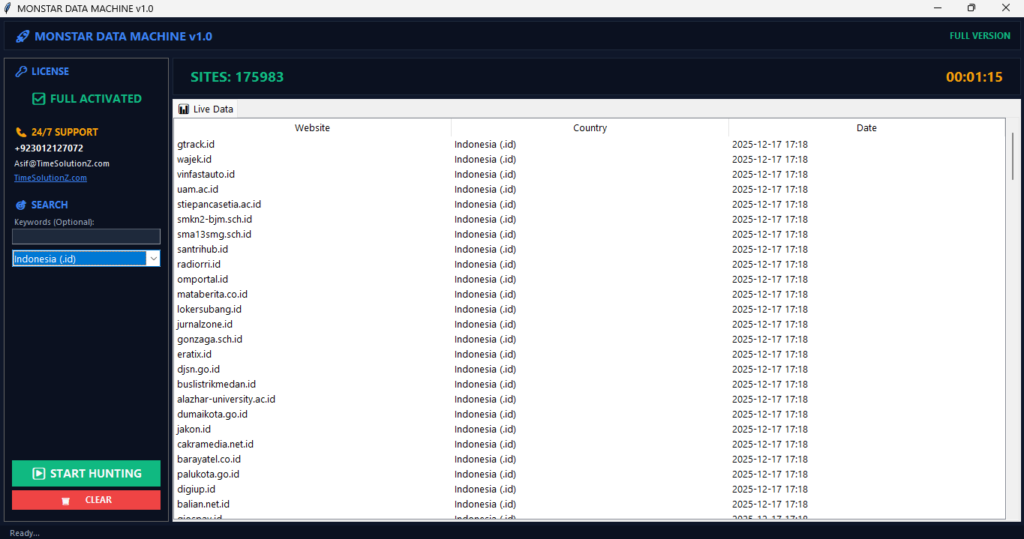
Whether you are an SEO professional auditing site architecture or a researcher gathering data, knowing the different methods to extract website links is essential for saving time. Manually copying URLs is slow, error-prone, and unsustainable for large projects.
Instead, you can use automated tools to quickly pull every hyperlink from a page into a structured format. This process, often part of how web scraping works, allows you to identify broken links, analyze competitor strategies, and streamline your digital workflow.
By choosing the right approach, ranging from simple browser extensions to advanced API crawlers, you can handle massive amounts of link analysis and data extraction with ease. Mastering these techniques will transform how you manage and organize web information today.
1. Choosing the Right Extraction Method (Quick Assessment)
How to Extract URLs Effectively, The most effective extraction method depends on your technical skill level and the total volume of data you need to collect from a website. Use this table to match your specific project requirements to the right tool, ensuring you balance ease of use with the power needed for high-quality data collection and management.
| Need | Best Method | Difficulty |
| A few links | Browser Extensions | Very Easy |
| Many pages | No-Code Cloud Scrapers | Easy |
| Large-scale data | API Crawlers | Hard |
| Enterprise automation | Custom Python/Node.js | Very Hard |
Start with browser extensions for small tasks. It’s fast. Use custom scripts to build a database of millions of URLs. That’s power.
Pro Tip (2026): Start with the simplest tool first. Beginners often choose complex code when a simple extension solves the problem instantly. Keep it simple.
2. No-Code Web Extractors: Visual Scraping for Non-Technical Users

No-code tools allow you to perform large-scale data harvesting by visually selecting elements on a page without needing to write any complex computer code. These user-friendly platforms bridge the gap between technical requirements and simple browsing, allowing anyone to gather important information for research while keeping their local computer hardware running very fast.
Point-and-Click Cloud Scrapers
These cloud-based platforms provide a simple visual interface that automatically turns selected web elements into organized, structured spreadsheets for your immediate use. They work well.
- These platforms provide a visual interface.
- You select the links you want.
- The tool detects patterns across the page.
- Cloud servers handle the work, so your computer stays fast.
Autonomous AI Navigators (Recording Live Browser Actions)
These smart tools mimic natural human clicking behaviors to navigate through complex website layouts and extract target data without any manual supervision or input. Just point it.
- You provide a starting URL.
- The tool finds pagination or “load more” buttons.
- It handles infinite scrolling automatically.
- It overcomes complex navigation issues.
3. One-Click Browser Extensions: Best for Instant Single-Page Extractions
Browser extensions allow you to extract all hyperlinks from a single web page instantly with just one simple click in your toolbar. These tools are highly effective for quick link analysis tasks, providing you with clean, organized lists that you can export immediately without needing to open any external software or complex programs. Use them often.
Dedicated Link Grabbers & Duplication Filters
A dedicated link grabber identifies every URL on your screen and automatically removes all duplicate entries to ensure your final list remains completely clean. It keeps things tidy.
- These tools sit in your toolbar.
- They scan the page instantly.
- They clean up your list.
- They prevent redundant data entries.
Web-Based Payload Parsers and Anchor Text Organizers
Use these specialized tools to extract both the target URL and the associated anchor text at the same time for better organization of your data. It organizes well.
- They organize links by their status.
- They separate internal from external links.
- They speed up your link analysis tasks.
- They export data directly into clean spreadsheets.
Pro Tip (2026): Export data directly into a CSV file. This lets you sort by domain to speed up your authority checks. Very smart.
4. Advanced API Crawlers: Bypassing Hidden JavaScript & Framework Barriers
Advanced API crawlers are designed to read the full content of a page, including elements that are hidden from simple tools, to find every link. These crawlers render the complete page, ensuring you do not miss any vital information that might be buried deep within complex code structures or dynamic website frameworks. They see everything.
Mapping Entire Site Structures via Headless APIs
Headless APIs function like a real web browser to render the full DOM structure of a page, which allows you to uncover every single hidden link. It finds truth.
- Modern sites use JavaScript to hide links.
- Simple scrapers miss this content.
- Headless APIs act like a real browser.
- This process improves your site structure mapping.
Overcoming Proxy Rotation, IP Blocks, and Captchas
Proxy rotation keeps your connection safe and reliable by automatically switching your IP address across global locations during your data extraction workflow. It prevents blocks.
- A large-scale data extraction workflow often triggers blocks.
- Proxy rotation mimics normal traffic.
- It switches your IP through global locations.
- It ensures steady web crawling efficiency.
5. Custom Scripting: Developer Frameworks for Enterprise-Scale Automation

Custom scripts written in popular languages like Python or Node.js provide the best level of control and speed for high-volume, complex data projects. These frameworks allow you to build automated systems that handle massive amounts of information efficiently, making them the top choice for developers and teams managing enterprise-level data collection needs. Real power.
The Python Approach: Fast Static HTML Scraping with BeautifulSoup
Python with BeautifulSoup is the fastest and most efficient way to extract links from static websites that do not require complex JavaScript rendering. It works fast.
- It reads HTML code directly.
- It avoids loading heavy graphics.
- It works perfectly for simple pages.
- It requires no JavaScript rendering.
The Node.js Approach: Dynamic Client-Side Extraction with Playwright
Node.js with Playwright provides the most reliable way to handle modern, complex web applications that load content dynamically through client-side scripting actions. It handles depth.
- It controls a real browser.
- It waits for the DOM parsing to finish.
- It handles complex, dynamic websites easily.
- It offers high accuracy for large tasks.
Pro Tip (2026): Use Playwright to simulate mobile device viewports. Some websites hide links unless they detect a mobile browser. Stay sneaky.
6. Ethical Web Scraping: Legality, Rate Limits, and Robots.txt Compliance
You must always scrape data in an ethical manner to ensure your access stays stable and to show proper respect for website owners. Play fair.
- Respect Robots.txt: Check the robots.txt file first. Avoid disallowed areas.
- Follow Rate Limits: Send requests slowly. High speed can crash servers.
- Identify Yourself: Include a contact email in your user-agent string.
- Personal Data: Do not collect private user information. Stay compliant with privacy laws.
FAQs
Why can’t I see all the links in the source code of a page?
Some links appear only after the site runs its internal JavaScript code. You must use a tool that renders the full DOM parsing to see these links. It’s hidden.
Is it legal to extract links from someone else’s public website?
Best practices for extracting large URL lists public data is generally is web scraping legal 2026, but you must follow the site’s terms. Never copy private content. Consult a legal expert for commercial projects. Be safe.
What is the fastest way to extract internal vs. external links separately?
Use a browser extension that categorizes links by domain during the scan. These tools let you filter for external links and export them instantly. The bottom line is, pick the right tool for your specific goal.