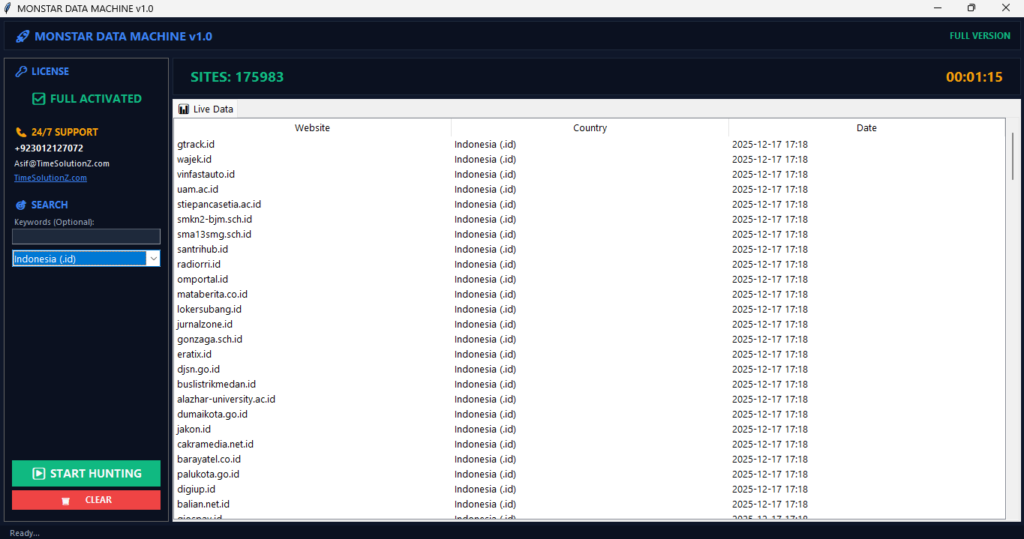
To scrape large lists without IP blocks, you need a smart plan. Many websites try to stop bots by tracking your proxy server activity. If you rush, they will flag your automated data collection as a threat.
But if you use the right tools, you can stay hidden. You must move slowly and change your IP rotation often to look like a real person. Do not use cheap, public networks. Instead, pick private residential IPs.
They are the secret to keeping your Ethical & Technical Scraping architecture safe from tough security walls. If you follow these simple steps, your scraper will stay online, collect data fast, and avoid those annoying error messages for good.
Why Websites Block Web Scrapers: The Anatomy of an IP Ban
Websites set up IP blocks to keep their data safe and their servers running fast. When a server receives too many hits from a single source, it triggers a security alarm.
These systems scan your traffic for robot-like patterns, such as strange timing or missing browser data, to justify stopping your connection. Think of your IP address like your home address.
If someone runs in and out of the front door 100 times in one minute, the guard, the server, will lock the door. The site does this because it thinks a robot wants to steal from it.
The Threshold: Request Limits and Rate Detection
Rate systems find scrapers by checking how fast requests arrive versus normal human speed. If your IP requests pages much faster than a human could click them, the server flags you as a bot.
Keeping your request times varied is the most important part of stopping automated rate-limiting and account bans today. Every site has a speed limit. Go fast? You get caught. Normal folks take time to read, scroll, and click. If you grab data faster than a human, the server stops you.
The Fingerprint: Browser Metadata and TLS Fingerprinting
Servers use TLS fingerprinting to check if your connection is real by looking at your digital handshake. If the metadata you send, like your cipher suites or protocol versions, does not match a real web browser, the server calls your work a fake and blocks the request.
Think of a bouncer checking your ID at a club. Your TLS fingerprint is like that ID. If the ID says you are 25, but you look like a child, or if the ID is missing a stamp, you are blocked.
Websites check your computer’s digital ID to see if you are a real browser.
The Gatekeepers: Cloudflare, PerimeterX, and Akamai in 2026
Modern security providers use AI to check your hardware, software, and behavior in real time to stop bad traffic. These gatekeepers match your data against huge lists of known bot signatures.
To bypass these walls, your scraping system must always copy the specific settings and network looks of a real user device. These big security firms are a smart wall around a castle.
They do not just look at one thing; they watch how you walk, what you wear, and how you talk. They use smart math to spot bots. To get inside, your scraper must copy a real human perfectly.
Core Strategy 1: Mastering IP Rotation and Proxy Management
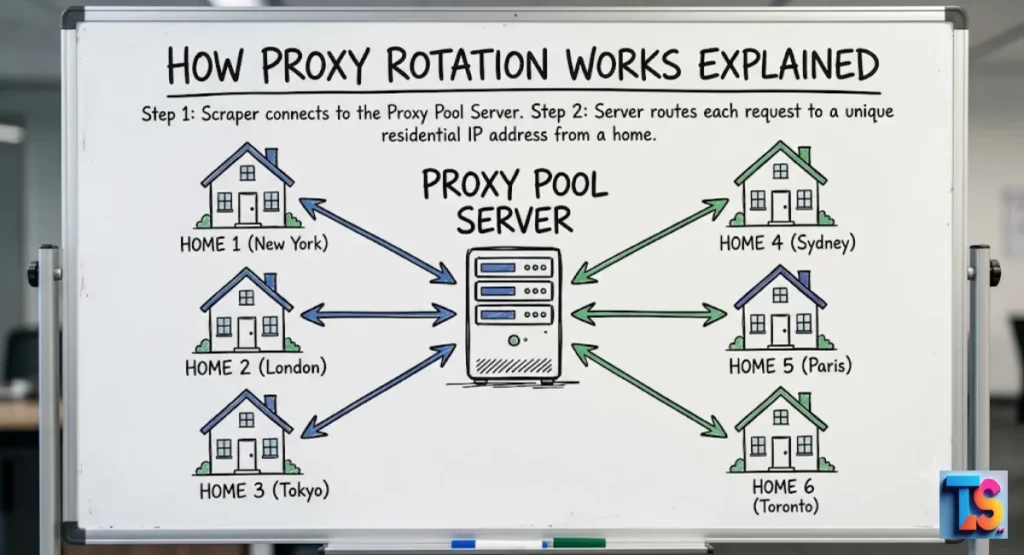
Datacenter vs. Residential vs. Mobile Proxies: Which Do You Need?
The success of your scraping depends on picking the right proxy for the target site’s security. Datacenter proxies are fast but easy to spot. Residential proxies use ISP-issued links, which have high trust.
Mobile proxies use cell network IPs, which makes them the hardest for security systems to tell apart from real humans. For small jobs, datacenter proxies work. But for big lists, they are too obvious.
Residential and mobile proxies are the best choice. They make your traffic look like it comes from a real home or a cell phone. This makes sites trust your requests much more than other types.
How to Build a Failproof Proxy Pool and Rotation Logic
Building a good pool means using a load balancer that cycles through a large set of unique IP addresses. You must set your rotation logic to give a new IP to every single request or short session.
This move stops servers from collecting traffic logs that would show your scraping as a script. This is a vital Proxy Rotation Guide for Beginners. Think of a proxy pool like a disguise kit. If you wear the same mask too long, everyone knows it is you. A rotation system gives you a new mask, a new IP, after every few minutes. This keeps the site guessing and makes it look like many different people are visiting.
The Secret to Avoiding Sequential IP Bans
Sequential bans happen when security systems find a predictable pattern of IP use or request timing. To stop this, you must use a random selection tool inside your proxy manager.
By picking IP addresses and session times at random, you ensure your footprint does not follow a clear pattern that security systems flag. If you always use IP number 1, then 2, then 3, you are following a pattern.
Computers love to spot patterns! To hide, you must pick your IP addresses randomly, like pulling names out of a hat. When you pick randomly, the site cannot guess what you will do next.
Why Free Proxies Will Get Your Scraper Blocked Instantly
Free proxies are rarely private and often have low trust scores and high blacklisting rates because bad actors use them too. Most websites already block these public IP ranges.
Relying on free proxies gives you zero reliability for big jobs and guarantees your scraper will get blocked by almost any modern security system now. Free proxies are like a busy public bus.
Because so many people use the same bus, it gets dirty and attracts attention. Websites already know these buses are full of bots. If you try to use them, the site will just turn you away because they are already on the blacklist.
Core Strategy 2: Looking Human (Advanced Request Optimization)
Beyond the Basics: Spoofing HTTP/2 and HTTP/3 Headers
Web servers check HTTP headers to confirm your requests match a standard web browser. If your request skips standard headers or uses old rules, the server marks the connection as fake.
By carefully copying the header order, casing, and values of modern browsers, you ensure your requests look just like real traffic. Think of a header as the clothes you wear to a party.
If everyone is wearing a suit, but you show up in a bathing suit, everyone will stare. Browsers wear specific clothes called headers. If your scraper does not wear the right ones, the site will quickly know you are not a real browser.
Dynamic User-Agent Rotation (And How to Keep It Updated)
A User-Agent string tells the server what browser and OS you are using. If your scraper uses a static or old User-Agent, you trigger immediate suspicion.
You must use a rotation system that pulls from a fresh list of real browser strings, ensuring each request looks like it comes from the latest software.
A User-Agent is like a business card that tells the site, “I am using Chrome.” If you show the same card 1,000 times in one minute, the site knows it is a fake.
You must use a variety of cards and keep them updated to match the newest software.
Emulating Human Behavior: Natural Delays, Jitter, and Mouse Movements
To beat behavioral checks, you must add random pauses between requests. This trick, called jitter, stops the server from seeing a fixed time between your actions.
Also, using fake mouse moves and natural scrolling in a headless browser helps the bot detector see you as a human instead of a script. If a robot clicks every 2 seconds, it is obvious. Real humans have jitter; sometimes we click fast, sometimes we pause to read, and sometimes we move the mouse.
By adding random pauses and fake mouse movements, your robot acts more like a person, which helps you stay hidden and avoid getting blocked.
Handling Cookies and Session Persistence Safely
Cookies are needed to keep your user session state across many page requests. If your scraper clears cookies between requests, the server sees a broken or weird session history.
Good session management means storing and reusing cookies to act like a returning user, which validates your ID and boosts your success against security walls. Cookies are like a digital name tag. When you visit a page, the site gives you a sticker.
If you come back, they expect to see that sticker. If you show up without it, they get suspicious. Saving cookies helps you act like a returning visitor, which makes the site trust you more.
Core Strategy 3: Bypassing Advanced Anti-Bot Walls (JS & Captchas)
The 2026 Headless Browser Stack: Playwright Stealth vs. Puppeteer
Modern headless browser tools need advanced stealth plugins to hide signs of automation. While normal tools show automation flags, special stealth plugins change browser settings to mask these signs.
Using the latest Playwright setup with stealth helps you pass hard bot checks that find common browser tools. If you struggle with delays, use these tools to fix Chrome Scraping Timeouts.
A headless browser is like a web browser without the window. It is great for robots, but it leaves fingerprints. Using tools like Playwright with stealth helps you clean up those prints. It is like wearing gloves so you do not leave any clues behind when you visit a site.
Solving CAPTCHAs Automatically: API Integrations vs. Behavior Emulation
When a site shows a CAPTCHA, it means your behavior has already triggered suspicion. While third-party APIs can solve them for you, they are slow and cost money.
The best strategy is to fix your human-like behavior, so you never trigger the challenge in the first place, keeping data flow fast daily. A CAPTCHA is a test to see if you are a human.
If you get one, it means you have already been caught acting like a bot. While services can solve them for you, it is better to never get one at all. Being a good user means the site will let you through without testing you.
Defeating Canvas and WebGL Fingerprinting
Websites use Canvas and WebGL tests to make a unique hardware ID based on how your graphics card draws things. To fight this, your scraping stack must randomize the graphic output or add noise to the draw process.
This stops the server from linking many sessions to the same physical computer hardware system. Every computer has a unique way of drawing graphics, like a signature. This is called a fingerprint.
If you scrape from the same computer, your signature is always the same. By using tools that change how your computer draws, you can change your signature, making it seem like many different computers are visiting.
Architecture for Scale: How to Scrape Millions of Items Safely

Distributing the Workload: Celery, Redis, and Microservices
Scaling to scrape millions of items needs a distributed team that splits task management from data gathering. By using a task queue like Celery and a store like Redis, you can split individual requests across many worker nodes.
This means if one node gets blocked, the whole scraping process keeps running. When you have millions of items, one computer cannot do it alone. You need a team of workers.
Celery and Redis act like managers, giving small, easy tasks to each worker. This way, if one worker gets blocked or stops, the rest of the team keeps working without any problems at all.
Cloud Scraping: Deploying Containerized Scrapers (Docker + AWS/GCP)
Running scrapers inside Docker environments on cloud providers lets you scale quickly across many regions. By spreading your scraping nodes across different data centers, you hide your network origin, making traffic look like it comes from local ISPs rather than one big data source.
This drops your total risk a lot. Cloud computing is like renting an office in different cities. If all your requests come from one building, the site gets suspicious.
By spreading your work across different cloud offices around the world, your traffic looks like it is coming from all over, which is much more natural and harder to block.
Smart Error Handling: How to React to 403, 429, and 503 Status Codes
When a target server sends back errors like 403, 429, or 503, it means your request volume is over the limit. You must use an error handler that pauses and uses exponential backoff math.
This lets the server’s security system reset your status, making sure you avoid an immediate and permanent IP address ban. If you see these errors, the site is saying stop or wait.
If you keep trying right away, you will get blocked. Exponential backoff is just a fancy way of saying wait a little bit longer every time you fail. This gives the site time to calm down so you can try again later.
The “Build vs. Buy” Dilemma: Scraping APIs and Managed Services
When to Code Your Own Infrastructure
Building a custom scraping system is smart when you need total control over data, your own hardware, or special request rules. You handle your own proxies, fingerprints, and error-handling steps.
This works best for teams that have deep tech skills and want to avoid the monthly bills that come with services. Building your own system is like building your own house.
You have total control over where everything goes and how it works. It is great if you have special needs or want to learn how it works. But you are also responsible for fixing every leak or broken window yourself.
Top Managed Scraping APIs That Handle Proxies and Blocks For You
Managed scraping APIs provide a finished solution that automates proxy management, CAPTCHA solving, and browser fingerprinting at scale. These sites offer a system where you just send a request, and they return the clean HTML.
Once you have the data, you may need to Format Scraped Data for CRM Import to make it useful. This is the best choice for teams that need high-volume, reliable data without keeping up a complex stack. Managed services are like staying in a hotel.
You do not have to worry about cleaning or repairs; you just show up and use the room. These services take care of all the hard work, like rotating IPs and solving CAPTCHAs, so you can spend all your time using the data you collected.
Ethical and Legal Web Scraping Best Practices
Respecting the Robots.txt File
The robots.txt file gives key rules on which parts of a site are off-limits for crawlers. You must read and respect these rules to stay ethical and avoid legal trouble.
Sticking to these file rules ensures that you are not grabbing private data or putting too much stress on the target site’s servers. The robots.txt file is like a keep-out sign on a fence. It tells you which areas are private.
You should always read it before you start. Respecting these rules is very important because it shows you are a good neighbor and helps you keep your scraping activities friendly and safe.
Scraping Data Responsibly Without Crashing Target Servers
Being responsible means managing your request speed so you do not hurt the site for other users. You should avoid scraping during busy hours and use rate-limiting to mimic real traffic flows.
By acting nicely and keeping your load low, you protect the site’s speed and keep your access for a long time. Think of a website as a shared park. If you bring a thousand people into the park at once, no one else can enjoy it.
Being a responsible scraper means visiting when the park is empty and not bringing too many people. This keeps the site fast for everyone and helps you keep your access.
Summary
To scrape large lists successfully in 2026, you must prioritize IP rotation, header management, and human-like behavior. Use high-quality residential proxies, handle errors with patience, and respect site boundaries.
Whether you choose to build your own system or use a managed service, staying updated with modern security trends is the key to avoiding blocks and gathering the data you need.