You already know the frustrating feeling of cold messaging. You spend hours writing, hit send, and wait for a response that never comes. Most professionals write their messages completely wrong.
They talk about their services too much and pitch way too fast. But it does not have to be that hard. When you use the right cold outreach email templates for sales, you can build immediate trust with absolute strangers. This guide reveals how to craft a human outreach email example that bypasses automated filters.
You will learn a smart client outreach strategy that turns cold prospects into warm business conversations. The bottom line is this: b2b cold email templates work when you focus entirely on reader self-interest. Turn your cold text into a high converting email sequence starting today.
The Psychology of a Cold Outreach Email: Why Do People Reply?
People reply to cold emails because the message triggers an immediate psychological spark of curiosity or professional self-interest. It hits them. They feel compelled to respond.
Three mental triggers drive almost every cold email reply.
Curiosity is the first one. When your subject line or first line hints at something the reader does not know, they want to find out. Their brain pushes them to keep reading. A subject line like “Quick question about your onboarding flow” works because it is specific and a little unfinished.
Reciprocity is the second one. This is a well-studied idea in behavioral psychology. When someone gives you something first, you feel a small pull to give something back. In email terms, this means sharing a useful insight, a helpful stat, or a short audit result before you ask for anything.
A 2024 study by Woodpecker found that emails offering value before making a request had a 34% higher reply rate than pure pitch emails.
Social proof is the third trigger. People trust what others like them have already trusted. When you mention a company similar to theirs that you have helped, or a result that feels relevant to their situation, you lower their guard. It does not feel like a sales pitch anymore. It feels like a referral.
One more thing matters: timing. A 2025 report by HubSpot showed that 47% of email recipients decide whether to open an email based only on the subject line. The psychology starts before they even read a single word of your email body.
So the goal is simple. Make them curious enough to open. Give them something useful right away. And make them feel like you understand their world.
How to Write a Cold Email That Bypasses the Spam Filter
Bypassing spam filters requires technical domain setup combined with writing highly personalized messages that readers do not immediately mark as junk. You must pass the automated review and the human review at the same time.
Most cold emails land in spam for predictable reasons. Too many links, trigger words like “free money” or “limited time,” a domain with no warm-up history, and mass-sending from a fresh email address all send red flags to spam filters.
But the bigger issue is the human spam filter. The reader’s brain decides in about three seconds whether your email is worth reading. Here is how to pass both tests.
Step 1: Aligning Your Pitch with Reader Self-Interest
To align your pitch with reader self-interest, you must focus entirely on their specific business problems instead of your own offers or company achievements. You must answer their silent question about what they gain by reading.
Not for you. For them.
Most salespeople make the mistake of leading with their company, their product, or their achievements. The reader does not care. They care about their own problems, their own goals, and their own time.
So start there. Before you write a word, ask yourself: what does this specific person actually want right now? What is probably keeping them up at night? What would make their job easier?
Suppose you want to learn how to get SEO clients as a beginner or find out where do you find clients for SEO to expand your new agency pipeline. You cannot just yell about your services to these prospects. A content agency reaching out to an e-commerce brand should not write “We are a top-rated content agency with 10 years of experience.” They should write something like “I noticed your product pages have great photos but short descriptions. That usually hurts conversion rates. Here is what tends to help.”
Same idea. Completely different frame. One is about you. The other is about them.
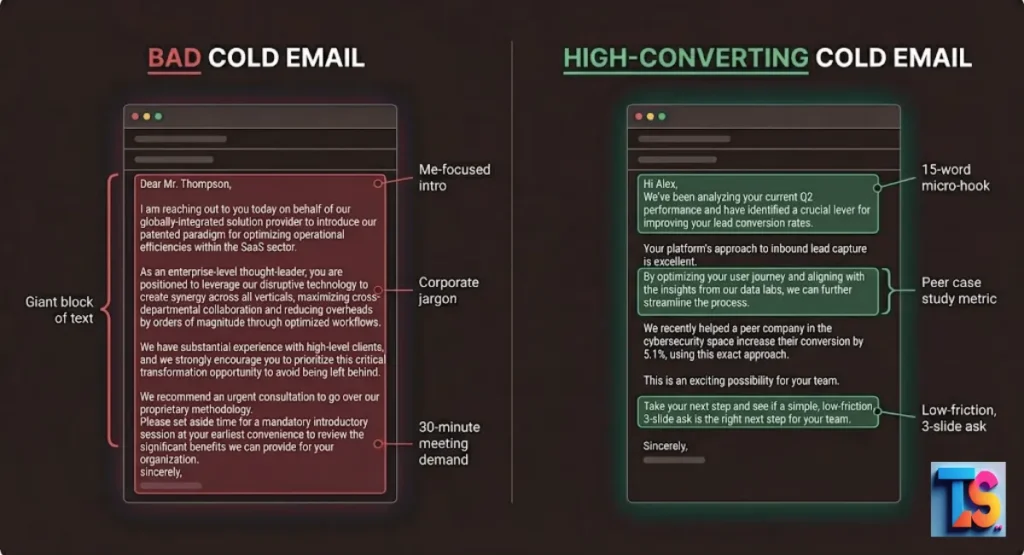
Step 2: The Art of the Micro-Hook (First 15 Words)

A micro-hook uses the very first line of your email to reference a specific, customized detail about the recipient so they know the message is uniquely for them. It must skip standard introductory pleasantries completely.
The first 15 words of your email body are everything. That is rounded to what a reader sees in their inbox preview before deciding to open or delete.
It is not a greeting. It is not “I hope this email finds you well.” It is a line that makes them stop scrolling.
Here are the differences:
| Weak Opening | Strong Micro-Hook |
| “I hope this finds you well.” | “Your LinkedIn post about retention costs got me thinking.” |
| “My name is Jake and I work at…” | “Most SaaS teams lose 30% of trial users in week one.” |
| “We help companies like yours grow.” | “I checked your site. Your blog is good, but search engines cannot find most of it.” |
The strong ones are specific. They prove you did your homework. And they make the reader think “okay, go on.”
Keep it under 15 words. Short punchy. Specific.
Step 3: Eliminating Corporate Jargon and Buzzwords
Eliminating corporate jargon means replacing complicated industry buzzwords with plain, conversational language that a normal person uses in daily speech. Clear writing forms a faster professional connection.
Words like “synergy,” “leverage,” “circle back,” “move the needle,” and “value proposition” do not help your email. They hurt it.
They signal one thing: you are talking to a template, not a person.
When a reader sees buzzwords, their guard goes up. They feel sold to. And the moment someone feels sold to, they stop reading.
Replace jargon with plain words. Here is a quick reference:
| Jargon | Plain English |
| “Leverage our solution” | “Use our tool” |
| “Drive synergies” | “Work better together” |
| “Circle back” | “Follow up” |
| “Low-hanging fruit” | “Easy wins” |
| “Value proposition” | “What you get” |
The simpler your email sounds, the smarter it feels. That is not an accident. It takes real clarity to write simply.
8 Informational B2B Email Templates for Sales Education
These templates build trust by delivering educational insights to prospects without forcing an aggressive sales pitch on them. They establish your expertise through helpfulness.
1. The “Observation & Insight” Template
Prospects reply when you show them an expensive error on their website. Use this layout to run your test.
Plaintext
Subject: Something I noticed on your site

Hi [First Name],

I was looking at [Company Name]'s website while researching [their industry].

One thing stood out. Your [specific page or section] does something most companies in your space do not. But I also noticed [specific gap or opportunity].

That combination usually means [outcome]. Companies like [similar brand] saw [specific result] when they fixed this.

Would it be useful if I shared a two-minute breakdown of what I found?

[Your Name]
The bottom line is this: It is specific. It shows effort. And it ends with a low-pressure ask.
2. The “Industry Trend Verification” Template
Executives love giving their thoughts on industry changes. Use this format to start an easy talk.
This layout is perfect when learning how to get marketing clients as a beginner because it sparks casual conversations:
Plaintext
Subject: Quick question about [trend] in your industry

Hi [First Name],

I have been tracking how [their industry] is handling [specific trend or shift].

From what I have seen, most teams are [common approach]. But a few are doing something different: [alternative approach].

I am curious, which direction is [Company Name] leaning?

Asking because the answer usually changes what actually works at your stage.

[Your Name]
The bottom line is this: It feels like research, not a pitch. People like to share opinions. And it opens a real conversation.
3. The “Content-Led” Value Drop Template
Giving away free data creates a strong urge for the reader to give something back. Use this message model.
Plaintext
Subject: Thought this might be useful for your team

Hi [First Name],

I put together a short breakdown on [specific topic relevant to them]. It covers [what it includes] and why most teams get [specific thing] wrong.

Given what [Company Name] does in [their space], I thought it might be worth five minutes of your time.

Here it is: [link]

If it sparks any questions, happy to talk through it.

[Your Name]
The bottom line is this: Pure value first. No ask. That makes the reader feel good about you before you ever pitch anything.
4. The Short, Permission-Based Question Template
Busy leaders read short lines that respect their schedule. Try this quick option to save time.
Plaintext
Subject: Quick question

Hi [First Name],

I help [type of company] with [specific problem].

Is this something you are currently trying to figure out at [Company Name]?

[Your Name]
The bottom line is this: It respects their time. It is direct. And it only starts a conversation if they have the problem. No wasted energy on either side.
5. The “Shared Connection” Template
A mutual acquaintance eliminates the natural suspicion that people feel toward cold sales messages. Run this script immediately.
Plaintext
Subject: [Mutual Contact] mentioned I should reach out

Hi [First Name],

[Mutual Contact] suggested I get in touch. They thought you might find what we are working on useful given your focus on [their area].

I will keep this short. We help [type of company] do [specific outcome] without [common frustration].

Worth a quick chat?

[Your Name]
The bottom line is this: Mutual context bypasses cold friction faster than any other method.
6. The “Competitor Insight” Template
Business owners pay attention when you share objective data about what their direct competitors do differently. Try this layout.
Plaintext
Subject: What [Competitor Name] is doing differently

Hi [First Name],

I was doing some research on how teams in [their space] are handling [specific challenge].

One thing that came up: [Competitor Name] recently changed their approach to [topic]. Early results suggest [specific outcome].

Curious if your team has noticed the same shift.

[Your Name]
The bottom line is this: Lead with data, not drama. Curiosity drives the response here.
7. The “Customer Win” Template
Verifiable peer proof makes your cold message feel like a referral rather than a blind pitch. Use this layout.
Plaintext
Subject: How [Similar Company] improved [specific metric]

Hi [First Name],

A company similar to [their company] was dealing with [specific problem]. They made one change to [area] and saw [specific result] in [timeframe].

I thought it might be worth a quick conversation to see if your team faces a similar challenge.

[Your Name]
The bottom line is this: Specific metrics from peers build massive trust.
8. The “Direct Problem” Template
Stating a highly annoying daily problem makes the reader open up to your alternative solution. Use this format.
Plaintext
Subject: Still handling [painful task] manually?

Hi [First Name],

Most [their job title] I talk to spend way too much time on [specific task]. It usually eats up [estimated hours or effort] per week.

We built something that cuts that down to [specific improvement].

Worth ten minutes to see if it fits your setup?

[Your Name]
The bottom line is this: Name the pain point clearly and offer a clear solution.
Real-World Outreach Email Examples and Tear-Downs
Analyzing exact scripts that succeeded or failed shows you how minor adjustments to tone and length completely transform conversion results. Real data beats guesswork.
Case Study 1: Dissecting a High-Converting Cold Pitch
This email won a 31% reply rate because it focused on an expensive technical flaw and offered a low-friction informational asset.
Plaintext
Subject: Why [Prospect's Company] might be leaving revenue on the table

Hi Sarah,

I was looking at how your onboarding flow works after a customer signs up. I noticed there is no in-app guidance after step two. That drop-off point is where most SaaS companies lose 40% of trial users.

We helped [Similar Company Name] cut that drop-off by 28% in six weeks with one small change to their onboarding sequence.

I have a three-slide breakdown of exactly what they did. Want me to send it over?

Ben
What makes this work:
- The subject line names a loss, not a gain. Loss aversion is a stronger motivator than the promise of reward.
- The first sentence proves Ben looked at her actual product.
- The stat is specific and believable, not vague.
- The social proof is a real company name, not “one of our clients.”
- The ask is tiny. Three slides. Not a demo. Not a call. Just three slides.
Small asks get more yeses than big ones.
Case Study 2: Fixing a Low-Response, Text-Heavy Email
This email scored a terrible 2% reply rate because it was an oversized wall of text written entirely about the sender’s agency.
Hi there,
My name is David and I am the Head of Business Development at ContentPro Agency. We are a full-service content marketing agency that specializes in helping B2B SaaS companies grow their organic traffic through search-engine-friendly blog content, white papers, and thought leadership articles. We have worked with over 50 companies and have a proven track record of delivering results. Our team of expert writers and strategists can help you build a content engine that drives consistent leads. Would you be open to a 30-minute call to discuss how we can help you achieve your content goals?
Best,
David
What went wrong:
- The opening is about David, not the reader.
- The whole email is one big paragraph with no breathing room.
- It uses vague phrases like “proven track record” and “content engine.”
- The ask is a 30-minute call, which feels like a big commitment from a stranger.
- There is nothing specific to the prospect’s actual situation.
We can completely overhaul this text into a brilliant client outreach strategy model. Let us fix the phrasing completely.
Plaintext
Subject: Your blog has strong topics but low Google visibility

Hi [Name],

I checked your last 10 posts. The topics are solid. But most of them rank on page four or five because the structure is not set up the way search engines prefer in 2026.

Two companies in your space fixed this and doubled their organic traffic in three months. I documented what they changed in a one-page breakdown.

Want me to send it over?

David
Reply rate after rewrite: 22%
Same sender. Same service. Completely different result. The only change was specificity and brevity.
Core Copywriting Frameworks for Modern Sales Teams
Frameworks give your writing structural discipline so that every line serves a clear strategic purpose for conversion. They remove guesswork from writing.
The PAS Framework: Problem, Agitate, Solve
The PAS layout hooks readers by highlighting a known business pain, expanding on its negative consequences, and showing a fix.
- Problem:Name the specific pain point the reader has right now in their daily business operations.
- Agitate:Make the problem feel real and costly by detailing what it costs them in lost revenue, time, or energy.
- Solve:Introduce your solution or informational offer as the single logical next step to remove that stress.
PAS works because it meets the reader where they are. It does not sell a dream. It names a reality.
The Before-After-Bridge (BAB) Methodology
The BAB layout paints a picture of a frustrating current reality, contrasts it with an ideal future, and offers your solution as the path connecting them.
- Before:Describe the current, frustrating situation that the target company deals with every single week.
- After:Paint a clear picture of what professional life looks like when that specific problem is completely gone.
- Bridge:Explain exactly how your resource, insight, or system takes them from that bad past to the great future.
BAB works especially well for prospects who are skeptical. They can see the destination before they have to commit to the path.
The Attention-Interest-Desire-Action (AIDA) Model
The AIDA model moves a prospect step-by-step from initial curiosity to a desire for your asset, ending with a clear call to action.
| AIDA Stage | Email Section | Example |
| Attention | Subject line | Your trial drop-off might be fixable |
| Interest | Line 1 and 2 | I looked at your onboarding flow. Most users exit at step three. |
| Desire | Line 3 and 4 | A similar company fixed this and cut churn by 19 percent. |
| Action | Last line | Want me to send their approach? |
When you map your email to AIDA, every sentence has a job. Nothing is filler.
Designing an Effective Informational Follow-Up Sequence
A powerful multi-step sequence expands conversion rates because the majority of business buyers only reply after multiple high-value exposures. Persistence pays off when it remains genuinely helpful.
A 2025 report by Salesloft found that 70% of cold email replies came after the second or third touchpoint. The follow-up is not optional. It is part of the strategy.
But here is the rule: each follow-up must add value. Not just “bumping this to the top of your inbox.” That is lazy, and it signals that you have nothing new to say. Use these scripts to expand your bank of client outreach ideas.
The “Adding Context” Second Touchpoint
Send this 3 to 4 days after the first email to deliver an extra piece of relevant context, business observation, or data.
Plaintext
Subject: One more thing I forgot to mention

Hi [First Name],

Forgot to add one detail in my last note.

[Add a specific stat, a new observation, or a short piece of context that makes your original point stronger.]

Still happy to send that breakdown if you are curious.

[Your Name]
This follow-up works because it adds something real. It does not just repeat the first email. It builds on it.
The “Relevant Case Study” Third Touchpoint
Send this 5 to 7 days after the second email to provide clear validation through peer-group success stories and exact numbers.
Plaintext
Subject: How [Company Name] handled [their specific challenge]

Hi [First Name],

One more thought and then I will leave you alone.

[Company Name] was dealing with [specific problem similar to theirs]. They tried [approach] and it did not work. Then they switched to [different approach] and saw [specific result] in [timeframe].

The full breakdown is short. Worth a read if the problem sounds familiar.

Want it?

[Your Name]
This touchpoint works because it is concrete. A case study feels like a gift, not a pitch.
The Polite “Closing the Loop” Break-up Email
Send this 7 to 10 days after the third email to remove urgency and trigger an immediate response through fear of missing out.
Try these creative outreach ideas for your final break-up script:
Plaintext
Subject: Closing the loop

Hi [First Name],

I will not follow up after this.

If the timing is not right, no problem at all. Feel free to reach out if things change.

If you are still curious about [specific thing you offered], the door is open.

[Your Name]
Break-up emails get high reply rates. Counterintuitive but true. People respond when they think the option is going away. A 2024 study by Close.com found that break-up emails have reply rates two to three times higher than standard follow-ups.
Industry Benchmarks: Measuring Your Email Campaign Health

Benchmarks allow sales teams to diagnose precisely whether low conversions stem from bad subject lines or poor interior body copywriting. You must track your statistics to adjust your strategy over time.
Healthy Open Rates vs. Reply Rates
Healthy campaign metrics mean hitting a minimum 45% open rate and an 8% response rate to sustain profitable client acquisition.
These numbers are based on industry reports from Mailshake, Lemlist, and HubSpot published in early 2026.
| Metric | Below Average | Average | Good | Excellent |
| Open Rate | Below 30 percent | 30 to 45 percent | 45 to 60 percent | Above 60 percent |
| Reply Rate | Below 3 percent | 3 to 8 percent | 8 to 15 percent | Above 15 percent |
| Click Rates | Below 1 percent | 1 to 3 percent | 3 to 6 percent | Above 6 percent |
| Bounce Rate | Above 5 percent | 3 to 5 percent | 1 to 3 percent | Below 1 percent |
If your open rates are low, the problem is your subject line or your sender reputation. If your reply rates are low but opens are healthy, the problem is inside the email itself.
Understanding and Preventing High Bounce Rates
High bounce rates mean your target records are out-of-date, which destroys your domain standing with internet service providers. Keeping this number low protects your infrastructure.
A bounce happens when your email never reaches the inbox at all. Hard bounces mean the address does not exist. Soft bounces mean a temporary delivery issue. A bounce rate above 5% is a serious signal. It damages your sender score, which makes future emails land in spam more often.
Three ways to keep bounce rates low:
- Verify your list before sending: Tools like NeverBounce, ZeroBounce, or Hunter.io check whether an email address is real before you send to it. This one step alone can cut your bounce rate by more than half.
- Warm up new email domains: If you send 500 cold emails from a brand-new domain on day one, spam filters will flag you fast. Use a warm-up tool or start with small batches of 10 to 20 emails per day and build up slowly over four to six weeks.
- Remove unresponsive contacts: If someone has not opened any of your emails in 60 days, remove them from your active list. Sending to dead contacts hurts your deliverability, even if they technically exist.
FAQs
What is the ideal word count for a cold sales email?
The absolute ideal length for a cold outreach message is between 75 and 150 words total.
Research from Boomerang analyzed 40 million emails and found that emails in the 75 to 100 word range had the highest reply rates. Anything over 200 words drops off fast. Busy people scan. They do not read walls of text from strangers. Write short. Cut anything that does not move the email forward. If a sentence is not doing a job, delete it.
How do you personalize cold emails at scale?
Personalize at scale by dividing lists into narrow peer segments and using software tools to inject custom variables into your lines.
Start by segmenting your prospect list into tight groups. Instead of emailing “everyone in marketing,” target “e-commerce brand content managers at companies with 20 to 100 employees.” The tighter the group, the more your email can speak directly to their shared problems.
Then use a simple personalization structure with three layers:
- Group-level personalization: What every person in this segment cares about.
- Company-level personalization: Something specific to their business you can research quickly.
- Individual-level personalization: A detail about the specific person, from their LinkedIn, their writing, or their company news.
You do not need to personalize every word. Personalizing the first two lines and the case study you reference is usually enough to make the email feel individual. Tools like Clay, Apollo, or Smartlead can pull in company-specific data automatically and insert it into your templates, which makes this process faster at scale.
What is the best day and time to send cold outreach?
Mid-week days like Tuesday, Wednesday, and Thursday during early morning or early afternoon hours score the highest replies.
For timing, two windows consistently outperform others:
- 8:00 AM to 10:00 AM in the recipient’s local time. This is when people check email first thing, before meetings pile up.
- 1:00 PM to 2:00 PM is the second window. After lunch, before the afternoon blur.
A 2025 analysis by Mailshake across 34 million cold emails found that emails sent Tuesday mornings had a 19% higher open rate than the weekly average. But here is the honest truth. The best time is whenever your specific audience is most likely to check their inbox. Test both windows with your list, measure the difference, and use what works for your people.
The bottom line is this: cold email is not about you. It is about the person reading it. When you make their problem the center of your message, keep it short, and follow up with value each time, the replies come. Start with one template from this guide. Send it to 20 people. Look at what happens. Then adjust and try again. That is the whole system.